Tag Archive for 2020

No More Facial Recognition From IBM

Updated 06/19/2020 – Redmond is reporting that the ACLU has uncovered evidence (PDF) that Microsoft was pursuing sales of its facial recognition technology after its vow to stop selling the software. The ACLU says Microsoft continued to pursue sales to the U.S. Drug Enforcement Administration (DEA) six days after the announcement. Microsoft president Brad Smith claimed the firm would stop selling facial recognition tech to U.S. police agencies until there is a national law in place that’s “grounded in human rights.”

The article calls MSFT’s Smith’s “stand” last week “as a bit hollow or misleadingly narrow” and “opaque transparency.”

Updated 06/12/2020 – CNN is reporting that Microsoft has fallen in line with IBM and Amazon. It has announced it will not sell facial recognition technology to police departments in the United States, at least until there is a federal law to regulate the technology.

Following IBM’s stand, Amazon has announced it will stop providing its facial recognition technology to police forces for one year.  TechCrunch makes the point that the Amazon announcement did not say if the moratorium would apply to the federal government. Amazon also did not say in the statement what action it would take after the yearlong moratorium expires.

Both firms are calling for national regulation of the tech. As I predicted below.

No More Facial Recognition From IBMIBM has made a step in the right direction in the fight against structural racism. IBM CEO Arvind Krishna sent a letter to the U.S. Congress citing concerns that artificial intelligence (AI) facial recognition software could be used for mass surveillance and racial profiling. As a result, IBM will no longer sell general-purpose facial recognition or analysis software.

IBM facial recognition changes

The company is not abandoning facial recognition. Reuters cites an IBM source that says, IBM will “no longer market, sell or update the products but will support clients as needed.” As Engadget points out, the move comes in the midst of protests over police brutality and discrimination capped by the apparent murder of George Floyd by Minneapolis police officers.

The use of AI and facial recognition has a history of privacy and bias problems. In 2019, Pew Research reported that  50% of U.S. adults said they did not trust tech companies to use facial recognition responsibly. 27% of the same group did not trust law enforcement agencies to use facial recognition responsibly. There are good reasons for the distrust of facial recognition. Many reports have found that facial recognition systems can be biased. They have systemic bias’ against non-whites and women. This is particularly true if the training data includes relatively few people from those groups. 

The Verge documents some of the defacto bias’ in facial recognition. In 2018, AI researchers Joy Buolamwini and Timnit Gebru, Gender Shades project was the first to reveal the extent to which many commercial facial recognition systems (including IBM’s) were biased. This work led to mainstream criticism of these algorithms and ongoing attempts to address bias.

Clearview AI Inc., facial recognition software identifies people by comparing their faces with 3 billion images many scraped from social media sites. Clearview took the images from Facebook, YouTube, and Venmo without notifying the people. The facial recognition tool is widely used by private sector companies and law enforcement agencies. Clearview has since been issued numerous cease and desist orders and is at the center of a number of privacy lawsuitsFacebook was also ordered in January 2020 to pay $550 million to settle a 2015 class-action lawsuit over its unlawful use of facial recognition technology.

The Verge points out that IBM is not without a share of the blame. IBM was found to be sharing a training data set of nearly one million photos in January 2019 taken from Flickr without the consent of the subjects. IBM told The Verge in a statement at the time that the data set would only be accessed by verified researchers and only included images that were publicly available. The company also said that individuals can opt out of the data set.

A December 2019 NIST study found:

empirical evidence for the existence of a wide range of accuracy across demographic differences in the majority of the current face recognition algorithms that were evaluated.


Amazon’s facial recognition software 

Notably, NIST’s study did not include Amazon’s facial recognition software Rekognition. Rekognition, has also been criticized for its accuracy. In 2018, the ACLU found that Rekognition incorrectly matched 28 members of Congress to faces picked from 25,000 mugshots.

Despite Amazon’s system providing what the ACLU called a disproportionate number of false matches of congress embers of color, Amazon posted a statement expressing concern over the “inequitable and brutal treatment of Black people in our country.” But the richest man in the world Jeff Bezos and his company are part of the problem. Amazon is profiting off racial profiling of Black people by police.

Amazon has built a nationwide surveillance network. The surveillance network of our homes and communities uses Amazon Ring cameras and its Neighbors app. The company collects the images and then handed its data over to the police. 

What Amazon does with the data:

rb-

Mr. Krishna should be applauded for his public stand. But call me cynical – this is also about business. Morgan Stanley predicts that AI and automation will be a one trillion dollar industry by 2050. Change is coming and big tech – IBM, MSFT, GOOG, FB are trying to get in front of it. The titans are pushing for reform – not abolition for two reasons.

First, they want to use new regulations as a barrier to entry into this market. They want to upstarts like Clearview AI and 45+ other small to multi-national firms who may have new ideas out of the $1T market.

Second – Big tech knows they can buy the politicians in DC cheaper than having to fight off regulations in 50 different states. Big business has done this time and again. they will sit in front of a congressional hearing – say mea culpa and maybe Congress will pass some lame regulation that the lobbyist wrote. Nothing will change because there is too much money on the table to do the right thing to stop the structural racism that led to George Floyd’s death.

Stay safe out there!

Related article


Ralph Bach has been in IT long enough to know better and has blogged from his Bach Seat about IT, careers, and anything else that catches his attention since 2005. You can follow him on LinkedInFacebook, and Twitter. Email the Bach Seat here.

9 Things To Do When You’re Slammed With Work

9 Things To Do When You’re Slammed With WorkWe have all been there – Work starts to stack-up –  deadlines, assignments, meetings, reports, bosses, staff and COVID-19 are all demanding your attention. How the %$#&*! do you get anything done with all of these distractions?

When we have too much to do, we can freeze. Spinning without traction, we move fast but don’t make progress on the things that are creating our stress. Because when there’s so much competing for attention, we don’t know where to begin and so we don’t begin anywhere. 50% of people report feeling overwhelmed at work. Herding turtles as a former co-worker described it.

Herding turtlesHaving a lot to do and having too much to do are very different things. No matter how you define them, a lot can be motivating, but too much can make you freeze in your tracks, resulting in you doing a whole lot of nothing. No matter how well prioritized your tasks and projects might be, when you have too much to choose from, you often simply don’t know where to start. Here are nine tricks to calm your mind and dive into your herd of turtles when you feel overwhelmed.

Freak out

Try giving yourself some space to freak out. Set a timer for ten minutes and freak out, surf the Intertubes or stare out the window. It will help get the anxiety out of your system.

Stop beating yourself up

Stop beating yourself up

Your reaction is normal. Get strategic about how to chip away at your work.

Take five breaths

The military uses tactical breathing (PDF) when faced with critical situations, and this technique is proven to help people handle frightening work stress. Breathe in for a count of four, hold for four, breathe out for four, and repeat.

Write it down

The act of writing by hand also has proven stress-relieving properties. Handwrite everything that needs to get done. Some people find comfort in handwriting their to-do list and seeing their nonthreatening penmanship on a sheet of paper.

Hand write everything that needs to get donePrioritize your work

Start with prioritizing by deadlines. For tasks with shared deadlines, order them by magnitude, putting the bigger items on top. Once your priority list is final, step back and see if this gives you a sense of order and direction on where to start. If you still have a hard time getting motivated, pick the task you most want to do. It’s better to do something than nothing.

Start with the easy stuff

What can you knock off in the next 15 to 30 minutes? Make phone calls, answer emails, etc. Then, attempt one of your beefier tasks.

You’re not aloneYou’re not alone

Talk with a co-worker. People love to help others solve problems. Share your project challenges with a trusted colleague what do when they have too much on their plate> What can you delegate? Can someone be bribed with a coffee? Can you talk to your manager to gain some perspective and guidance about your workload and priorities.

Use Timers

Set a timer for 30 or 40 minutes – something you can commit to. Focusing your attention will increase your motivating stress and decrease your paralyzing stress. The contained time periods will also give you a framework that will help you chip away at the important work.

Harvard Business School explains that working against time keeps us focused. Using a short time frame actually increases the pressure but it keeps our effort specific, and particular to a single task. That increases good, motivating stress while reducing negative, disconcerting stress.

Go for a walkTake Twenty

Go for a walk or get a coffee. Take some time to truly disengage your brain from the work you’re doing. You’ll be surprised at the focus and brilliance you bring to your big list of tasks when you’re feeling refreshed.

Feeling overwhelmed and stressed doesn’t have to stop you from being productive. Instead, there are real steps we can take to make what we need to do more manageable, which will help us get more done.

Stay safe out there!

Related article


Ralph Bach has been in IT long enough to know better and has blogged from his Bach Seat about IT, careers, and anything else that catches his attention since 2005. You can follow him on LinkedInFacebook, and Twitter. Email the Bach Seat here.

Pac-Man – 12 Things to Know

12 Things to Know About Pac-Man

Pac-Man turned 40 this Memorial Day weekend. Pac-Man is the best-selling arcade game ever. The video game was created by game designer Toru Iwatani, who was 24 at the time. The idea for Pac-Man came to him when he removed a slice from a pizza. Pac-Man was originally called Puck-Man – but was changed because of how easy it was to turn that into an obscenity.

Pac-Man arcade gameThe game was produced by the Japanese company Namco and distributed in the U.S. by Chicago-based Bally-Midway. Between its debut in a Tokyo theater on May 22, 1980, and 1990 Namco sold 400,000 Pac-Man gaming cabinets to arcades around the world and made $3.5 billion ($7.7 billion in 2020) in lifetime sales. The arcade game was played more than 10 billion times in the 20th century.

Pac-Man’s success

A large part of Pac-Man’s success, in an era where almost all games were space-themed shooters (Galaga, Missile Command, Space Invaders), was its non-violent, maze-chase gameplay. The game presented something fresh and new. The new ideas in Pac-Man did something few other games did at that time – it appealed to female gamers. This universal attraction helped bring an unprecedented number of players into arcades around the world, who shoveled billions of quarters into its slots.

Best-selling arcade games of all time - StatistaPac-Man was also a pioneer in character development. The game had a defined main character, which was unheard of at the time. Chris Melissinos, curator of the 2012 Smithsonian American Art Museum exhibition “The Art of Video Games.” told CNN

Here comes this game that’s brightly colored and centered around a character that really doesn’t have a gender … And all of a sudden, we found a mascot — the first character in video games that existed not just in the artwork, but in the game itself. 

The ghosts

Mr. Iwatani told Wired that Popeye was the inspiration for Pac-Man’s ability to attack his enemies by eating fruit. Pac-Man’s protagonists, the ghosts Blinky, Pinky, Inky, and Clyde each have their own personalities based on early artificial intelligence (AI) routines. Blinky  (red) constantly chases Pac-Man, Pinky (pink) attempts to ambush him, Inky (light blue) is randomized depending on Pac-Man’s position and Clyde (orange) will get close to the player then attempt to flee to the bottom left corner, potentially cutting off escape routes. Mr. Iwatani told CNN, “We introduced an AI-like algorithm that sent the ghosts to surround Pac-Man from all sides.

Pac-Man game

Pac-Man has conquered all media

The popularity of Pac-Man opened the door to the first generation of gaming merchandise. Pac-Man has conquered all media – Online, print, music, and merchandising. Here are 12 other things you should know about Pac-Man.

  1. When a playable version of Pac-Man appeared on the Google Doodle it cost the world almost 5 million man-hours and $120 million in lost productivity.
  2. Pac-Man has appeared in more than 90 games. The Pac-Man spin-off, Ms. Pac-Man, is a top 5 best-selling arcade game, according to U.S. Gamer.
  3. Pac-Man on the cover of Time MagazineHe has been on the cover of Time Magazine.
  4. Pac-Man is a rock star. The Pac-Man inspired song Pac-Man Fever reached number nine on Billboard’s Top 100 chart in March 1982. The song sold more than a million copies
  5. “Weird” Al Yankovic recorded “Pac-Man” in 1981 set to the music of the Beatles classic “Taxman.”  It was not officially released until 2017.
  6. The game’s distinctive sound was an inspiration to early hip-hop pioneers; including Jonzun Crew’s Pack Jam and Newcleus’s Jam on Revenge (The Wikki-Wikki Song).
  7. He is a TV star. In a 1982 episode Taxi, Louie (Danny DeVito) installs a Pac-Man cabinet in the garage and Jim (Christopher Lloyd) becomes addicted to the game. The scene is effectively a how-to guide and an ad for Pac-Man rolled into one.
  8. Pac-Man has appeared on The Simpsons5 times. In episode 343, Homer was researching previous Super Bowl halftime performances and looked back on a tape of Pac-Man marrying Ms. Pac-Man as the ghosts danced and celebrated to the song “Physical” by Olivia Newton-John.
  9. He has had two television cartoons. First was Pac-Man: The Animated Series from Hanna-Barbera which ran on ABC from 1982-83 and then there was Pac-Man and the Ghostly Adventures (2013-2016) that was launched to support the new 3-D Pac-Man on Xbox 360, PlayStation 3, and Wii U.
  10. Pac-Man is a merchandising maniac. Sports-card manufacturer Fleer produced three Pac-Man trading card sets. One set is based on the original arcade game, one is centered on Ms. Pac-Man, and a third is based on the Super Pac-Man game.
  11. Chef BoyardeeChef Boyardee Pac-Man pasta released Pac-Man pasta in three varieties: cheese, meatballs, and chicken. Of course, the pasta’s were formed in the shape of Pac-Man and Ms. Pac-Man.
  12. Counter-intuitively, the video game even had a board game. Milton Bradley published the Pac-Man board game in 1982  – which is going for $75.00 on eBay these days.

rb-

I recall playing Pac-Man on a console at Pizzuti’s Pizza while in HS. My arcade game really stepped up when I lived around the corner from Pinball Pete’s in Ann Arbor (which burned down in 2009) and was dodging work while on campus.

Stay safe out there!

Related article


Ralph Bach has been in IT long enough to know better and has blogged from his Bach Seat about IT, careers, and anything else that catches his attention since 2005. You can follow him on LinkedInFacebook, and Twitter. Email the Bach Seat here.

Memorial Day 2020

Thank a Veteran this Memorial Day


Memorial Day 2020


Stay safe out there!

Related article


Ralph Bach has been in IT long enough to know better and has blogged from his Bach Seat about IT, careers, and anything else that catches his attention since 2005. You can follow him on LinkedInFacebook, and Twitter. Email the Bach Seat here.

Make Excel Dance

Make Excel DanceI was working with a newish Project Manager the other day and we were building a data collection tool to log some intermittent errors and she was fussing about how to build the tool to get data. Should she email a Word form to the team? I finally asked her what’s wrong with Excel?

I suggested she build the form in Excel, post it up to SharePoint, that way everybody on the team has access to the same document and you don’t have to tease the data out of 50 different emails.

You know Bob the Boss likes clear directions with bullet points on his forms and you can’t do that with Excel.

Say what? – Well newbie you can make pretty text in Excel.  Here’s how…..

Use the right font

WMicrosoft Excelhen you have a lot of information to present – the temptation might be to use a small font  –  don’t people will ignore it if they can’t read it. When it comes to choosing the best font for displaying both text and numbers, the font you choose matters.

From a readability point of view, the Times New Roman font is considered to be easier and faster to read compared with other fonts. Times New ­Roman is a serif typeface introduced in 1932 by the British newspaper The Times. The Times New Roman font’s serif design makes reading easier because the characters are more recognizable. But styles evolve over time:

  • Times New Roman font was fashionable in the 1970s;
  • The Helvetica font was the go-to font in the 1980s;
  • The Arial font was dominant during the 1990s;
  • The Verdana font was widely adopted in the 2000s:
  • The Calibri font is widely used today.

Microsoft (MSFT) introduced Calibri with Windows Vista in 2006. It is basically a skinnier version of the Arial font. The Calibri font was specifically engineered to be highly legible for both alphabet and numerical characters on today’s smaller handheld devices.

Now that you have made a good choice for your font use it. The Font list is on the Home ribbon- Click font and select the font you want to use. (No Wing Dings or anything that starts with Gothic right?)


Break up the text

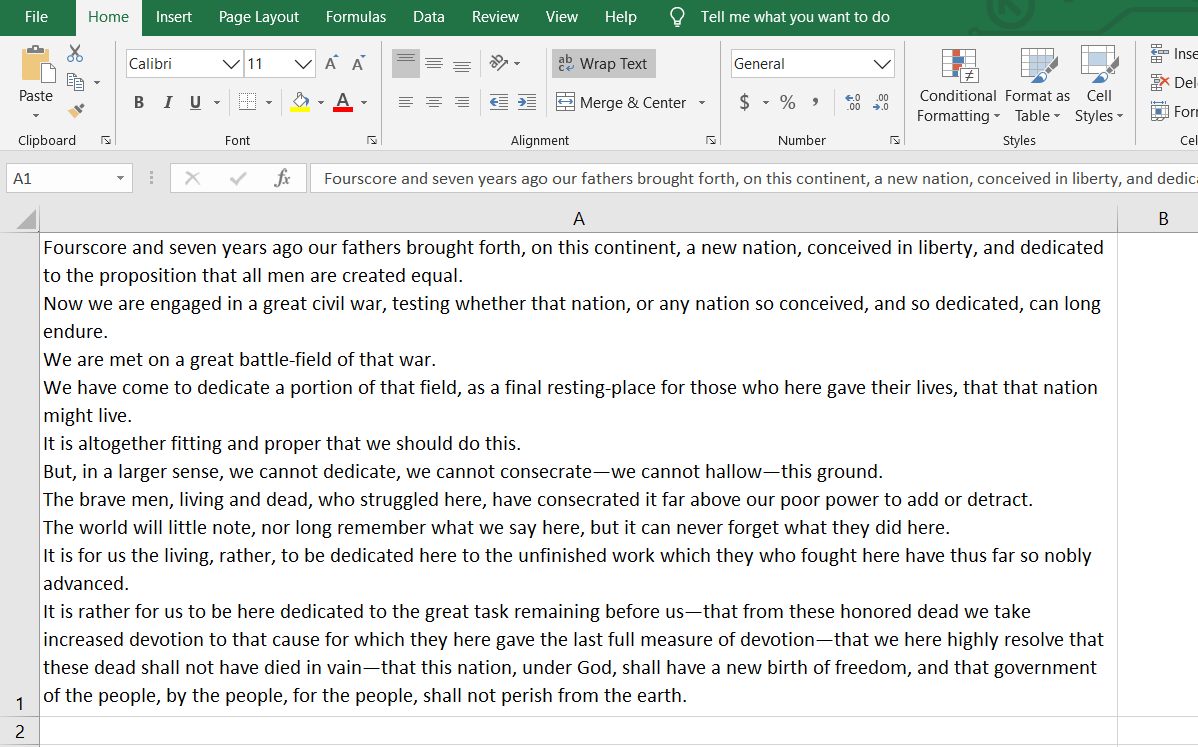
When you have a lot of information to explain about a certain task, it’s helpful to include a few paragraphs in one cell. By default, a bunch of text in a cell is truly unreadable. But – you can make Excel display pretty paragraphs.

First your need to expand the column width. The column width will determine how many lines are needed to display the text. Use one wide column rather than multiple rows for lengthy text entries for greater readability and for any lists of data.

To expand the column width put your cursor on the cell boundary and left click on your mouse and drag your column out. Don’t worry about the final column width yet – you can adjust it again and again and again.

Now that you have a bigger column – wrap your text. Click in the cells (or an entire row or column) where you want to display your text. Then click on the Wrap Text button on the Home ribbon.

Or you can right-click on the selection and choose Format Cells, pick the Alignment Tab, and check the option for Wrap Text, finish with OK.


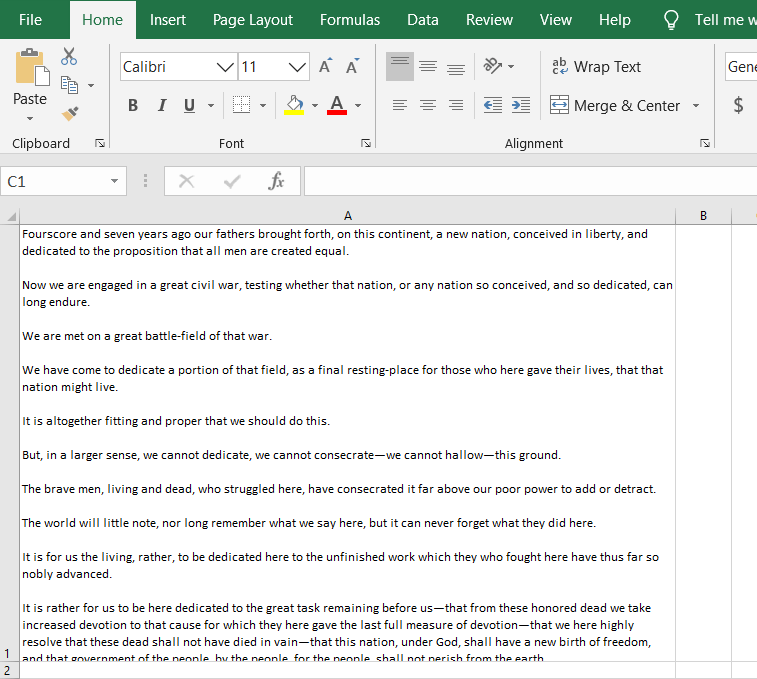
Now – type away! Add as much content as you’d like to the cell. You will have a big blob of text. To improve its readability – insert line breaks in the cell. Line breaks make dense information easier to digest by making it easier to read.

When you’re at a point where you’d like to start a new line, simply press [Alt] + [Enter].

insert line breaks in the cell
Want to add a blank line to create paragraphs in your cell? Press [Alt] + [Enter] twice.

insert paragraph breaks in the cell

Add bullet points to an Excel cell

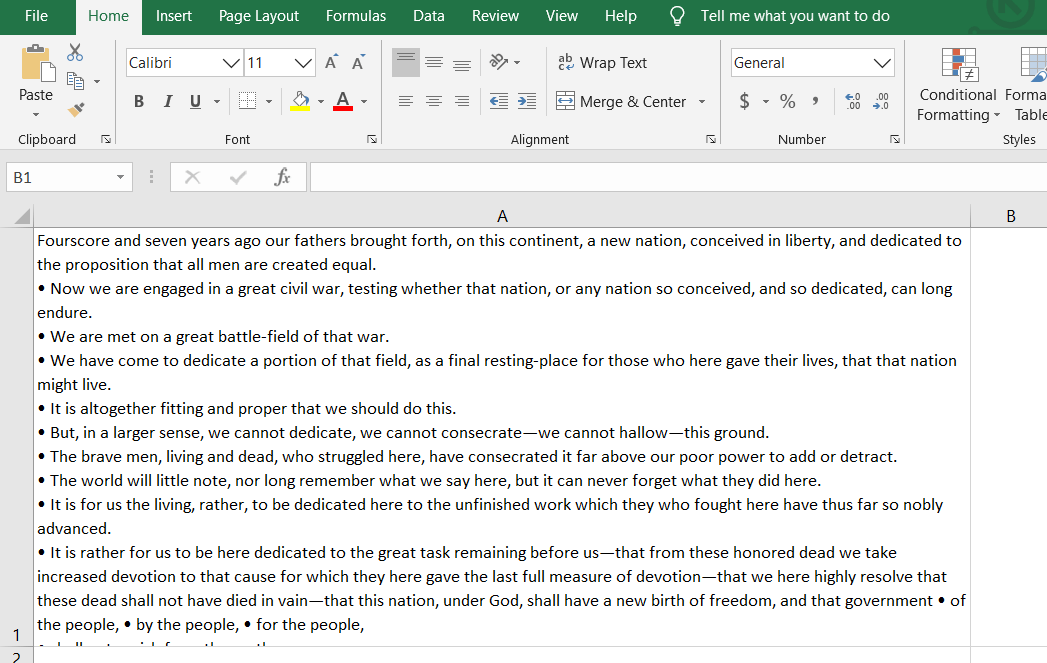
You can also add bullet points in an Excel cell. Bullet points are a great way to concisely convey important pieces of information or instructions. You can easily add bullet points to any cell in Excel spreadsheets.

  1. Double-click on the cell you want to add the bullet to.
  2. Position the cursor at the point that you want to insert a bullet.
  3. Hold down the Alt Key and type 0149 from the numeric keypad.
  4. A bullet appears.

insert bullet points in the cell

With these easy steps, you can make Microsoft Excel dance for you.

rb-

This is for Windows users – Mac users – your mileage may vary on some of these tips and tricks – but it should be doable.

The transcript of President Lincoln’s Gettysburg address is courtesy of Cornell University.

Stay safe out there!

Related article


Ralph Bach has been in IT long enough to know better and has blogged from his Bach Seat about IT, careers, and anything else that catches his attention since 2005. You can follow him on LinkedInFacebook, and Twitter. Email the Bach Seat here.