Tag Archive for PMP

PMP Renewed

Renewed my Project Management Professional (PMP) certification with the Project Management Institute (PMI).


PMP certificate


Stay safe out there!

Related article


Ralph Bach has been in IT long enough to know better and has blogged from his Bach Seat about IT, careers, and anything else that catches his attention since 2005. You can follow him on LinkedInFacebook, and Twitter. Email the Bach Seat here.

9 Things To Do When You’re Slammed With Work

9 Things To Do When You’re Slammed With WorkWe have all been there – Work starts to stack-up –  deadlines, assignments, meetings, reports, bosses, staff and COVID-19 are all demanding your attention. How the %$#&*! do you get anything done with all of these distractions?

When we have too much to do, we can freeze. Spinning without traction, we move fast but don’t make progress on the things that are creating our stress. Because when there’s so much competing for attention, we don’t know where to begin and so we don’t begin anywhere. 50% of people report feeling overwhelmed at work. Herding turtles as a former co-worker described it.

Herding turtlesHaving a lot to do and having too much to do are very different things. No matter how you define them, a lot can be motivating, but too much can make you freeze in your tracks, resulting in you doing a whole lot of nothing. No matter how well prioritized your tasks and projects might be, when you have too much to choose from, you often simply don’t know where to start. Here are nine tricks to calm your mind and dive into your herd of turtles when you feel overwhelmed.

Freak out

Try giving yourself some space to freak out. Set a timer for ten minutes and freak out, surf the Intertubes or stare out the window. It will help get the anxiety out of your system.

Stop beating yourself up

Stop beating yourself up

Your reaction is normal. Get strategic about how to chip away at your work.

Take five breaths

The military uses tactical breathing (PDF) when faced with critical situations, and this technique is proven to help people handle frightening work stress. Breathe in for a count of four, hold for four, breathe out for four, and repeat.

Write it down

The act of writing by hand also has proven stress-relieving properties. Handwrite everything that needs to get done. Some people find comfort in handwriting their to-do list and seeing their nonthreatening penmanship on a sheet of paper.

Hand write everything that needs to get donePrioritize your work

Start with prioritizing by deadlines. For tasks with shared deadlines, order them by magnitude, putting the bigger items on top. Once your priority list is final, step back and see if this gives you a sense of order and direction on where to start. If you still have a hard time getting motivated, pick the task you most want to do. It’s better to do something than nothing.

Start with the easy stuff

What can you knock off in the next 15 to 30 minutes? Make phone calls, answer emails, etc. Then, attempt one of your beefier tasks.

You’re not aloneYou’re not alone

Talk with a co-worker. People love to help others solve problems. Share your project challenges with a trusted colleague what do when they have too much on their plate> What can you delegate? Can someone be bribed with a coffee? Can you talk to your manager to gain some perspective and guidance about your workload and priorities.

Use Timers

Set a timer for 30 or 40 minutes – something you can commit to. Focusing your attention will increase your motivating stress and decrease your paralyzing stress. The contained time periods will also give you a framework that will help you chip away at the important work.

Harvard Business School explains that working against time keeps us focused. Using a short time frame actually increases the pressure but it keeps our effort specific, and particular to a single task. That increases good, motivating stress while reducing negative, disconcerting stress.

Go for a walkTake Twenty

Go for a walk or get a coffee. Take some time to truly disengage your brain from the work you’re doing. You’ll be surprised at the focus and brilliance you bring to your big list of tasks when you’re feeling refreshed.

Feeling overwhelmed and stressed doesn’t have to stop you from being productive. Instead, there are real steps we can take to make what we need to do more manageable, which will help us get more done.

Stay safe out there!

Related article


Ralph Bach has been in IT long enough to know better and has blogged from his Bach Seat about IT, careers, and anything else that catches his attention since 2005. You can follow him on LinkedInFacebook, and Twitter. Email the Bach Seat here.

Make Excel Dance

Make Excel DanceI was working with a newish Project Manager the other day and we were building a data collection tool to log some intermittent errors and she was fussing about how to build the tool to get data. Should she email a Word form to the team? I finally asked her what’s wrong with Excel?

I suggested she build the form in Excel, post it up to SharePoint, that way everybody on the team has access to the same document and you don’t have to tease the data out of 50 different emails.

You know Bob the Boss likes clear directions with bullet points on his forms and you can’t do that with Excel.

Say what? – Well newbie you can make pretty text in Excel.  Here’s how…..

Use the right font

WMicrosoft Excelhen you have a lot of information to present – the temptation might be to use a small font  –  don’t people will ignore it if they can’t read it. When it comes to choosing the best font for displaying both text and numbers, the font you choose matters.

From a readability point of view, the Times New Roman font is considered to be easier and faster to read compared with other fonts. Times New ­Roman is a serif typeface introduced in 1932 by the British newspaper The Times. The Times New Roman font’s serif design makes reading easier because the characters are more recognizable. But styles evolve over time:

  • Times New Roman font was fashionable in the 1970s;
  • The Helvetica font was the go-to font in the 1980s;
  • The Arial font was dominant during the 1990s;
  • The Verdana font was widely adopted in the 2000s:
  • The Calibri font is widely used today.

Microsoft (MSFT) introduced Calibri with Windows Vista in 2006. It is basically a skinnier version of the Arial font. The Calibri font was specifically engineered to be highly legible for both alphabet and numerical characters on today’s smaller handheld devices.

Now that you have made a good choice for your font use it. The Font list is on the Home ribbon- Click font and select the font you want to use. (No Wing Dings or anything that starts with Gothic right?)


Break up the text

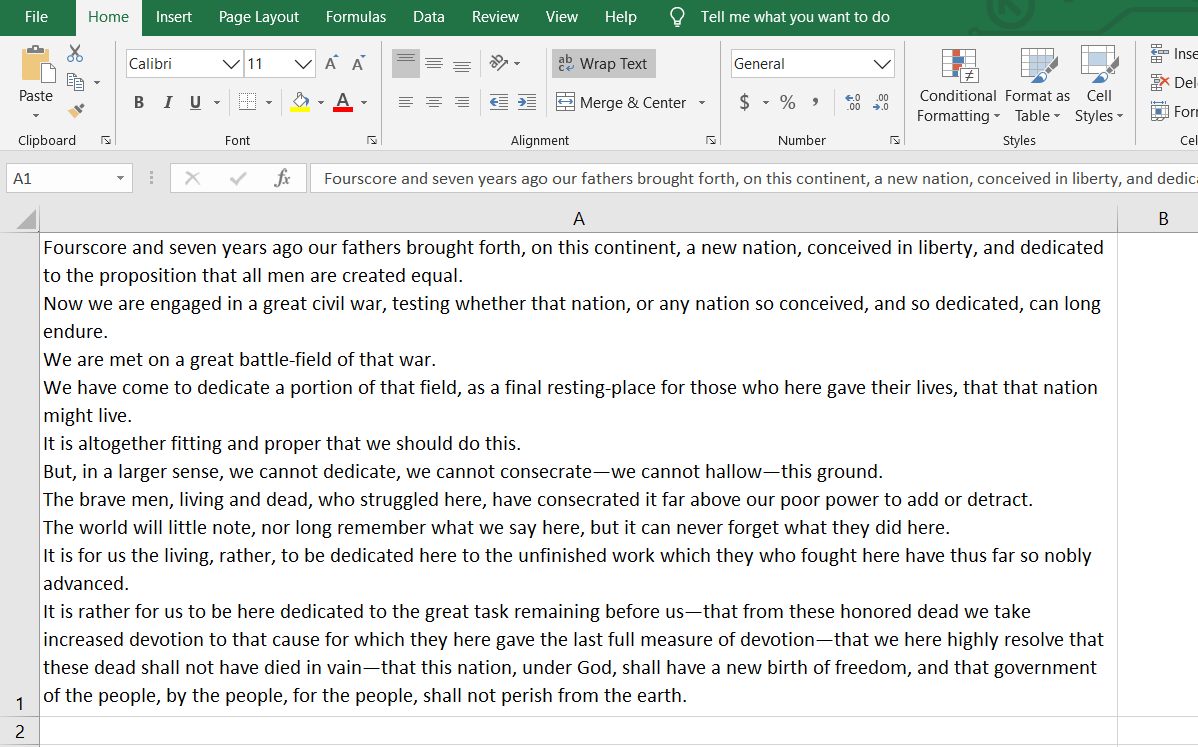
When you have a lot of information to explain about a certain task, it’s helpful to include a few paragraphs in one cell. By default, a bunch of text in a cell is truly unreadable. But – you can make Excel display pretty paragraphs.

First your need to expand the column width. The column width will determine how many lines are needed to display the text. Use one wide column rather than multiple rows for lengthy text entries for greater readability and for any lists of data.

To expand the column width put your cursor on the cell boundary and left click on your mouse and drag your column out. Don’t worry about the final column width yet – you can adjust it again and again and again.

Now that you have a bigger column – wrap your text. Click in the cells (or an entire row or column) where you want to display your text. Then click on the Wrap Text button on the Home ribbon.

Or you can right-click on the selection and choose Format Cells, pick the Alignment Tab, and check the option for Wrap Text, finish with OK.


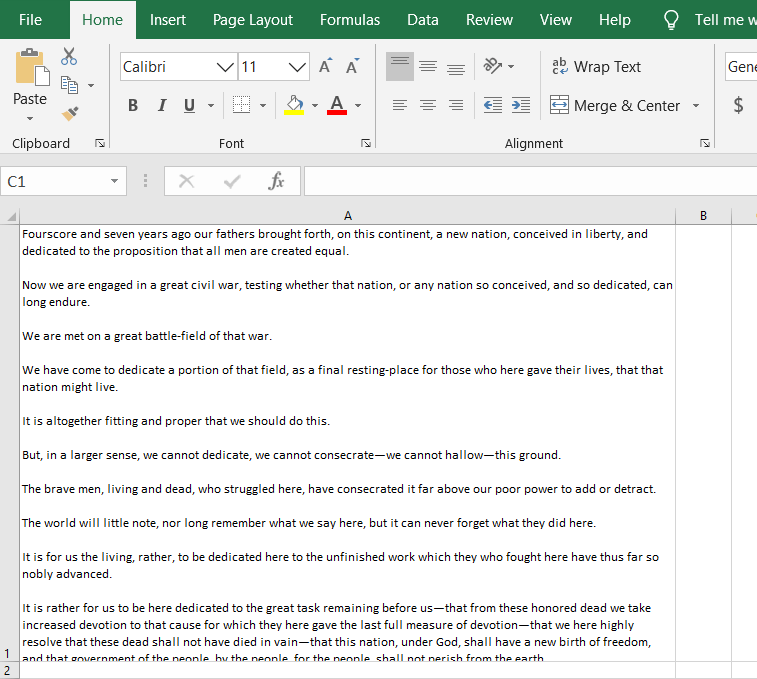
Now – type away! Add as much content as you’d like to the cell. You will have a big blob of text. To improve its readability – insert line breaks in the cell. Line breaks make dense information easier to digest by making it easier to read.

When you’re at a point where you’d like to start a new line, simply press [Alt] + [Enter].

insert line breaks in the cell
Want to add a blank line to create paragraphs in your cell? Press [Alt] + [Enter] twice.

insert paragraph breaks in the cell

Add bullet points to an Excel cell

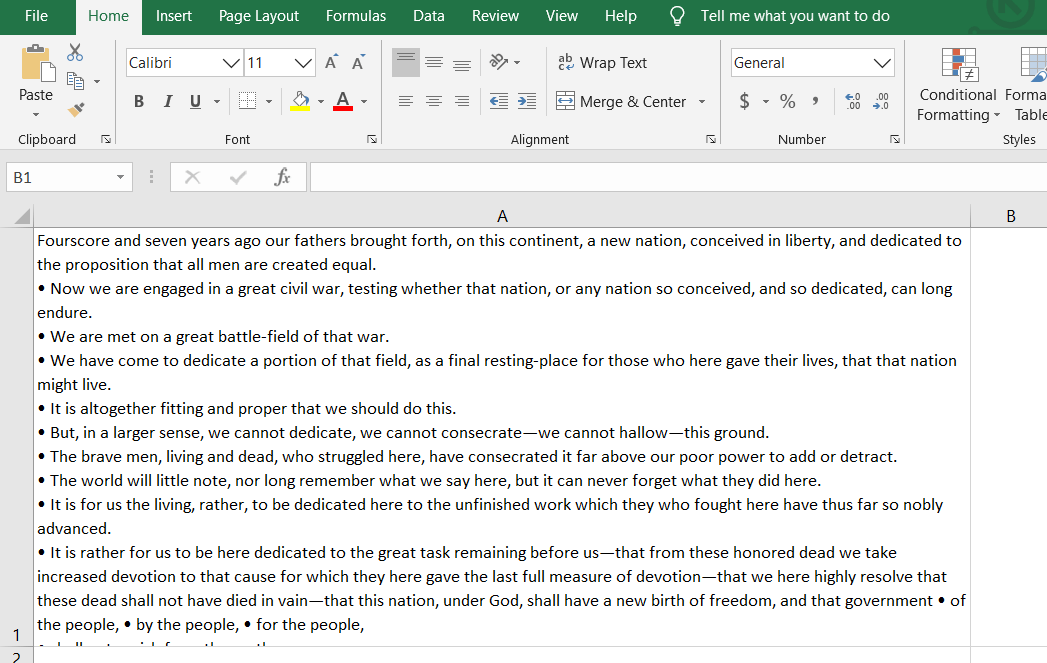
You can also add bullet points in an Excel cell. Bullet points are a great way to concisely convey important pieces of information or instructions. You can easily add bullet points to any cell in Excel spreadsheets.

  1. Double-click on the cell you want to add the bullet to.
  2. Position the cursor at the point that you want to insert a bullet.
  3. Hold down the Alt Key and type 0149 from the numeric keypad.
  4. A bullet appears.

insert bullet points in the cell

With these easy steps, you can make Microsoft Excel dance for you.

rb-

This is for Windows users – Mac users – your mileage may vary on some of these tips and tricks – but it should be doable.

The transcript of President Lincoln’s Gettysburg address is courtesy of Cornell University.

Stay safe out there!

Related article


Ralph Bach has been in IT long enough to know better and has blogged from his Bach Seat about IT, careers, and anything else that catches his attention since 2005. You can follow him on LinkedInFacebook, and Twitter. Email the Bach Seat here.

The Lost Art of Effective Flow Charts

The Lost Art of Effective Flow ChartsPracticing project managers know that there are many times when reality clashes with the PMI world. One of the real-world PMI visions of PM life is the “Business Analyst” role. Despite what the Project Management Institute (PMI) thinks, PMs have to do other jobs. One of the “non-PM” jobs I often have to take on is “Business Analyst.” and one of the Business Analyst tools I often use are flow charts.

Flow chartYes, the flow charts that we learned about in high school Basic computer programing class. The flow chart can help you communicate with your business users better. A well-done flow chart can describe and break down a process for easier explanation and help you improve a process. More importantly, creating a flow chart helps you understand the process and look for improvements.  It also helps you focus on each individual step, without feeling overwhelmed by the bigger picture.

Flow charts are one of the 7 basic Tools and Techniques called out in the PMBOK Project Quality Management knowledge area. The other PMBOK Quality Management tools and techniques are histogramPareto chartcheck sheetcontrol chartcause-and-effect diagram, and scatter diagram. (rb- Know this for the PMP exam)  The is an ISO standard for flow charts, ISO 5807:1985 – Information processing — Documentation symbols and conventions for data, program and system flowcharts, program network charts, and system resources charts for $120.00 US.

Flow Chart Basics – To draw a flowchart, develop a list of the tasks and decisions made during a process, and write them down in order. Enter the purpose (start/stop/decision/etc.) of each symbol within the shape and connect them with arrows to show the direction of the flow.

Flow Charts are usually drawn using standard symbols; however, some special symbols can also be used when required. If you use non-standard symbols people may not understand them and you will fail to clearly communicate your message. Below are some commonly used symbols for charting processes…

Start - StopUse this shape to represent an event which occurs automatically. Such an event will trigger a subsequent action, for example 'receive telephone call', start or stop.
ProcessUse a rectangle to represent an event which is controlled within the process. Typically this will be a step or action which is taken. In most flowcharts this will be the most frequently used symbol.
Connector
Use a line with an arrow to indicate the direction of the process flow.
DecisionUse the diamond shape to represent a decision point in the process. Typically, the statement in the symbol will require a 'yes' or 'no' response and branch to different parts of the flowchart accordingly.
SubroutineThis shape is used to represent a pre-defined process. The text in the shape should be a descriptive name of the process it represents. The process that it represents must be defined elsewhere.
DocumentFlowchart Document SymbolUse this shape to for a process step that produces a document.
PauseThis shape is used to indicate a waiting period.
On page linkUse a pair of circles to replace long or confusing lines on a flowchart page.  The name or reference for the other process should appear within the symbol.
Off page linkUse this shape to represent a point at which the flowchart connects with another on another page . The name or reference for the other process should appear within the symbol.

The following are some flowcharting tips:

  1. Keep it simple
  2. Begin by listing each step of the process using the symbols above – just put your ideas on paper (screen?) and correct them from there. It will surprise you how much you learn about your organization in this process.
  3. The usual direction of the flow is from left to right or top to bottom.
  4. Put an arrowhead on the flow line to show the decision process.
  5. Only one flow line should come out from a process symbol.
  6. Only one flow line should enter a decision symbol, but two or three flow lines, one for each possible answer, should leave the decision symbol.
  7. Only use one flow line in conjunction with the terminal symbol.
  8. Use only brief descriptions in standard flow chart symbols. If needed, use an annotation call-out to describe the step more clearly.
  9. Use two on-page reference symbols to cut the number of flow lines in a complex diagram.
  10. Avoid crossing flow lines.
  11. Ensure that the flowchart has a logical start and finish.
  12. Challenge your flow chart to make sure that it’s an accurate representation of the process.

You can use Microsoft (MSFT) Visio, Word, or even Excel to build flowcharts. There are a number of flow chart creation tools online – Draw.io, Pencil Project (“free”) Gliffy online (“free”).

rb-

flow charingYou can use the flow chart as a process improvement tool. Make sure that it represents the current state and then you can use it to discuss changes to the process with your users to make sure it represents the most efficient way of doing the process.

Related article


Ralph Bach has been in IT long enough to know better and has blogged from his Bach Seat about IT, careers, and anything else that catches his attention since 2005. You can follow him on LinkedInFacebook, and Twitter. Email the Bach Seat here.

PDU’s for PMP’s

PDU's for PMP'sIt’s almost a new year. Is your New Years’ resolution to get your Project Management Institute (PMI) mandated professional development units (PDU’s) for the year completed? Well, it should be…  Here is a list of PM training resources to help you earn those PMI PDU’s. I hope you find these resources helpful!

Most of these fall under the PMI Self-Study (PDU Category C) requirements. If you take part in any of these activities and it was relevant to project management, had a specified purpose, and used knowledgeable resources then you can claim 1 PDU for each hour spent on this as “self-study”. There are a maximum of 30 PDU’s for this and any other Category C activities per recertification period (3 years).

Reading for PDU’s

You can earn up to 30 PMI (Category C) PDU’s by reading books. Some of the recommended include:

Results Without Authority: Controlling a Project When the Team Doesn’t Report to You by Tom Kendrick – It’s hard enough to lead a project when you’re the boss. Leading a project team that doesn’t report to you is a whole new challenge in itself. Mr. Kendrick walks through how to motivate a team to contribute to a project’s success.

Earn Category C PDUs by reading booksAlpha Project Managers: What the Top 2% Know That Everyone Else Does Not by Andy Crowe – Using data from a survey of more than 800 project managers from around the world, Mr. Crowe looks at what traits and practices make the top 2% of PM’s rise above the rest. Readers will walk away with actionable steps they can take to rise to the top.

Delivering Bad News in Good Ways: Turn Difficult Conversations into Purposeful Dialogue, Positive Outcomes, & Focused Results in 3 Easy Steps by Alison Sigmon – While there are a lot of books out there about the proper ways to deliver bad news, this one is directed at PMs. Ms. Sigmon gives project managers a defined process to not only break the bad news but also improve communication over the long term.

Making Things Happen: Mastering Project Management by Scott Berkun – Drawing from his years leading technology projects at Microsoft (MSFT), Mr. Berkun offers readers field-tested philosophies and strategies for defining, leading, and managing projects. If you’re leading technology projects, this is a must-read.

Adaptive Project Management: Leading Complex and Uncertain Projects by Andy Silber – Mr. Silber presents a new methodology, Adaptive Project Management, in this book. He explains how to succeed or fail fast for projects that are too uncertain to use waterfall project management and too complex to succeed with agile project management.

The Effective Executive: The Definitive Guide to Getting the Right Things Done by Peter F. Drucker – An oldie but a goodie. Don’t let the title dissuade you from reading. Mr. Drucker’s lessons about time management, prioritization, and effective decision-making can be applied to any knowledge worker.

Getting Things Done: The Art of Stress-Free Productivity by David Allen – The book that started it all; this is the definitive guide to GTD. In the age of multitasking and information overload, Getting Things Done is the book we need to find focus.

Getting Things Done. In this podcast enhancement to the book.  Mr. Allen talks with people who are in different stages of their GTD journey and offers practical tips for building your own GTD systems.

The Checklist Manifesto: How to Get Things Right by Atul Gawande – Mr. Gawande, a renowned surgeon, and New Yorker writer, is a proponent of the simple checklist. At first glance, the subject sounds like it could be just another dry how-to book, but his anecdotes and writing skills take this one to another level. He expertly blends storytelling, science, and productivity.

The Productivity Project: Accomplishing More by Managing Your Time, Attention, and Energy by Chris Bailey – After college, Mr. Bailey turned down two lucrative job offers and instead funneled his energy into chronicling productivity experiments on his blog. This book has the results of these experiments, plus interviews with leading productivity experts and 25 takeaway lessons that the reader can apply to everyday life.

The Power of Habit by Charles Duhigg – Mr. Duhigg explains the science of how habits work — and how we can change them. About 40% of the actions we do in a day are habits — so we’re on autopilot for almost half our life. Identifying what triggers your habits is key.

Podcasts for PDU’s

Earn PMI Category C PDUs by listening to podcastssYou can earn up to 30 PMI (Category C) PDU’s by listening to podcasts. Some good ones are:

The Project Management Podcast. Hosted by Cornelius Fitcher, the PM Podcast has more than 300 free and paid podcasts. He brings in PM experts to talk about a variety of topics, everything from how to become a PM to managing unknown risks.

The People and Projects Podcast. Andy Kaufman interviews experts on PM, productivity, and management on his People and Projects Podcast. He releases a new podcast every three to four weeks.

The Lazy Project Manager. Hosted by Peter Taylor, this podcast began in 2013 after he published his best-selling book by the same name. Mr. Taylor is described as “one of the most entertaining and inspirational speakers in project management today.” Topics and themes really run the gamut on this podcast, with new podcasts being released at least once a month.

PM for the Masses. Cesar Abeid brings a lot of guests to his popular podcast. Topics cover everything from public speaking to methodology to careers.

The Tim Ferriss Show. Hosted by Tim Ferriss, author of The 4-Hour Work Week, this podcast was the first business/interview podcast to pass 100,000,000 downloads. He brings on well-known personalities to dissect what tools, techniques, and tactics they used to get where they are.

Back to Work. In this award-winning podcast, Merlin Mann and Dan Benjamin discuss productivity, constraints, tools, and communication. Mann and Benjamin offer a nice balance of clever banter and teaching in every one-hour episode.

Massive Open Online Courses

MOOC'sMOOCs can get online the opportunity to take a class from institutions around the world.

edX – Was founded in 2012 and is governed by more than 90 global partners. EdX is the only leading MOOC provider that is both nonprofit and open source.

Project Risk AssessmentUniversity of Michigan – In this course, you will learn how to conduct risk analysis of different projects using both conceptual and practical developments in modern finance. – Self Paced – Verified Certificate $99.00

Strategic Applications of IT Project & Program ManagementUniversity of Washington –  This course focuses on learning project management methodologies in the IT field, and why they are effective. This course introduces you to project management standards and frameworks that increase efficiency and deliver tangible business benefits to IT projects. – Self Paced – Verified Certificate $79.00

International Project ManagementRochester Institute of Technology – This course addresses the knowledge, skills, and behaviors required to successfully manage projects that span organizations, national boundaries, and cultural differences. – Starts on May 17, 2018 – Verified Certificate $150.00

Coursera Agile Development Specialization – This course provides a beginner overview of the Agile methodology, specifically within software projects. You’ll learn to coördinate all aspects of the agile development process, including running design sprints, managing teams, and fostering a culture of experimentation. – Cost: $49 monthly Coursera subscription

Lynda.com – The online learning platform Lynda.com offers more than 90 courses related to project management. Many of these courses qualify for PDU’s through PMI. – Cost: Free for the first 30 days, then $19.99 per month – Start date: On-Demand

Project Management Websites

Project Management WebsitesProject Management Institute (PMI) – Everyone’s go-to project management resource is PMI. Their website is chock full of helpful information, including articles, white papers, online courses, and webinars

Microsoft Project Users group – MPUG is recognized as the official Industry Association for Microsoft® Project. MPUG delivers PMI PDU eligible online training, deep-dive certificate series sessions, hundreds of on-demand training videos helpful articles and resources, as well as a community forum for all your Microsoft Project Questions. $99.00 annual membership

A Girl’s Guide to Project Management – PM expert Elizabeth Harrin, writes about a variety of project management topics. Her strength is writing about careers, leadership, and teams within the PM space. She also provides free templates and toolkits to help PMs excel at their jobs.

Project Times – A well-curated site of helpful articles, webinars, white papers, and case studies about project management. Project Times isn’t afraid to post the offbeat (i.e., “Why Project Managers Shouldn’t Wear Man Buns”), which makes for a fun read.

Harvard Business Review – While HBR isn’t solely focused on PM, its focus on management, leadership, and careers is beneficial and applicable to any office dweller. They hide their content behind a paywall.

Herding Cats – Glen Alleman writes about a variety of topics related to Agile methodology and project management.

CIO – The project management section of the CIO website has some great content within the context of IT and tech PM. Articles cover everything from implementing an ERP system to managing project budgets.

What is your favorite source for PDU’s Let me know and I will add it to the list in the comments.

Related article


Ralph Bach has been in IT long enough to know better and has blogged from his Bach Seat about IT, careers, and anything else that catches his attention since 2005. You can follow him on LinkedInFacebook, and Twitter. Email the Bach Seat here.