Tag Archive for iPhone

What Happened to the Paperless Office?

What Happened to the Paperless Society?The Economist wonders whatever happened to the “paperless office”? Thirty years ago computers were hailed as the beginning of the paperless office era. In 1980 The Economist recommended that firms trying to improve productivity “reduce the flow of paper, ultimately aiming to abolish it”.

Unfortunately not many people listened to The Economist. Since they extolled the virtue of a paperless office, global paper consumption has increased by half.

Paper consumption

The average American uses almost six 40-foot trees a year in paper. Gizmodo says don’t feel too bad. The EU bureaucracy in Brussels pushed the Belgian paper consumption to a whopping 8.5 trees per person. The equivalent to four Rockefeller Center Christmas trees.

Paperless office research says

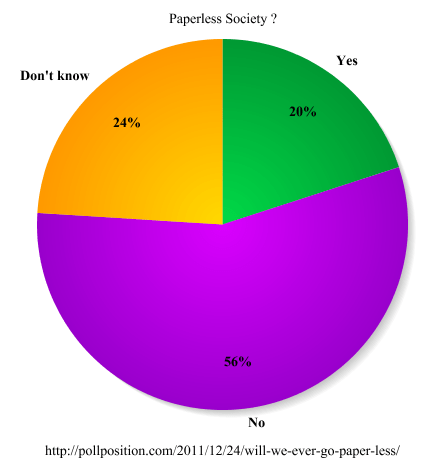
The trend will not change. A report from ITnewsLink reports that more than half of Americans think the U.S. will never go paperless. Pollster Poll Position conducted a national survey to see if Americans think the U.S. could ever be a paperless society.

Poll Position researchPoll Position’s research found that 56% of Americans said they don’t think the U.S. would ever be a paperless society. Only 20% said yes, one day we’ll all go paperless. 24% of Americans were undecided or had no opinion on the question.

Other Poll Position finding

  • 63% of the 18-29 age group said the U.S. would never be a paperless society and 23% said we could be a paperless society.
  • 56% of men and women said we could never be a paperless society.

You can still vote in their online companion poll.

rb-

I think that in an era of computers, Amazon (AMZN) Kindle Fire and Apple (AAPL) iPad tablet computers, iPhones and Google (GOOG) Android smartphones that paper consumption would decrease. Apparently it takes more than buzzwords like “paperless” and “green” to make a difference.

Related articles
  • The Paperless Office? (Going Green) (whattheythink.com)


Ralph Bach has been in IT long enough to know better and has blogged from his Bach Seat about IT, careers and anything else that catches his attention since 2005. You can follow him at LinkedInFacebook and Twitter. Email the Bach Seat here.

The Connected Home

Help – My Thermostat is Calling China!

The Connected HomePhil Neray of Q1 Labs, an IBM (IBM) company posted that in the recent Chinese hack of the U.S. Chamber of Commerce’s network. One attack vector was a thermostat. The thermostat at a Chamber townhouse on Capitol Hill was communicating with an Internet address in China. At the same time, a printer spontaneously started printing pages with Chinese characters (rb- I wrote about securing printers here).

The blog says that the hackers were in the network for more than a year before being detected is not unusual. He cites the 2011 Data Breach Investigations Report, more than 60% of breaches remain undiscovered for months or longer (versus days or weeks).

rb-

This is one of the risks of the Internet of Things. Security is in the era of IoT will have to use machines to monitor the machines.

CIA Chief: We’ll Spy on You Through Your Dishwasher

CIA Chief: We'll Spy on You Through Your Dishwasher Spencer Ackerman at Wired points out that more personal and household devices are connecting to the internet. They are no part of the Internet of Things. \U.S.CIA Director General David Petraeus cannot wait to use your appliances to spy on you through them.

General Petraeus recently spoke about the “Internet of Things” at a summit for In-Q-Tel, the CIA’s venture capital firm. “‘Transformational’ is an overused word, but I do believe it properly applies to these technologies particularly to their effect on clandestine tradecraft” the blog recounts.

Mr. Ackerman predicts that people will be sending tagged, geolocated data that a spy agency can intercept in real-time. This will happen when they open their Sears (SHLD) Craftsman garage door with an app on an Apple (AAPL) iPhone. “Items of interest will be located, identified, monitored, and remotely controlled through technologies such as radio-frequency identification, sensor networks, tiny embedded servers, and energy harvesters — all connected to the next-generation internet using abundant, low-cost, and high-power computing.” Petraeus said, “the latter now going to cloud computing, in many areas greater and greater supercomputing, and, ultimately, heading to quantum computing.”

Wired says the CIA has a lot of legal restrictions against spying on American citizens. But collecting ambient geolocation data from devices is a grayer area. This espcially ture especially after the 2008 carve-outs to the Foreign Intelligence Surveillance Act. Hardware manufacturers, it turns out, store a trove of geolocation data; and some legislators have grown alarmed at how easy it is for the government to track you through your Apple iPhone or Sony (SNE) PlayStation.

rb-

The implications of the “Internet of Things” are profound when linked to the transformational nature of the connected home network. The CIA sees great opportunities in wired home devices. Any home gadget with RFID, sensor networks, embedded servers, or energy harvesters is ripe for interception by spy agencies.

Koubachi Wi-Fi Plant Sensor Gives Your Plant a Voice

Koubachi Wi-Fi Plant Sensor Gives Your Plant a Voiceat CeBIT 2012 in Hannover Koubachi, the Swiss start-up company behind the popular iPhone plant care assistant presented its newest innovation. It is called the Koubachi Wi-Fi Plant Sensor according to ITnewsLink. Building on the success of its popular interactive plant care assistant, the sensor integrates into the Koubachi system to literally gives your plant a voice.

The Wi-Fi Plant Sensor measures soil moisture, light intensity, and temperature. Using Wi-Fi, the data is sent to the Koubachi cloud. There it is analyzed by the Koubachi Plant Care Engine. The plant owner gets detailed care instructions on watering, fertilizing, misting, temperature and light through push notifications or email. “The Koubachi Wi-Fi Plant Sensor is the first device ever that enables real-time monitoring of the plant’s vitality,” says Philipp Bolliger, CEO of Koubachi. “It’s a truly unique product in the field of “Internet of Things” and bringing state-of-the-art technology to plant care.

Smart Gadgets are Like Sleeper Cells in Your Kitchen

Smart Gadgets are Like Sleeper Cells in Your KitchenManufacturers are “future-proofing” their appliances with “Internet of Things” capabilities that are latent for now. Christopher Mims at MIT’s Technology Review asserts that major appliances bought in the last three years probably contain a Zigbee capable wireless radio. The radio can send out information about a device’s status and energy use and receive commands that alter its behavior.

Many appliance makers don’t announce these capabilities. Mr. Mims interviewed Mike Beyerle, an engineer at GE (GE) about GE‘s Nucleus home energy management system. “We want to build up a base before we make a big deal out of it,” says Mr. Beyerle.

The author says that manufacturers aren’t telling consumers what their devices are capable of. They are reluctant to do so in part because the abilities are useless without an energy management hub like GE’s Nucleus or a utility company‘s smart meter. In both cases, smart appliances must be “bound” to a hub to communicate with the outside world.

Once a device is hooked up to an energy management system and becomes part of the IoT, it gets interesting. Mr. Mims says that users who signed up for a “demand response” program with their utility to get a lower bill, enable the utility to control their appliances. For example, a refrigerator’s icemaker’s defrost cycle or the elements in a clothes dryer can be manipulated to drive down power use during times of peak demand.

rb-

Most people do not realize that installing a new smart meter can activate a technological sleeper cell in their HDTV, kitchen, or laundry room. All of these “smart” devices will be part of the “Internet of Things.” They will have an IP address (probably an IPv6 address) and will be broadcast via a Zigbee wireless network. This is why the CIA says it can spy on people through their dishwasher.

Connected Kitchen

Connected KitchenEngadget says the Samsung RF3289 fridge is designed to let users access Pandora or tweet while grabbing a snack. Samsung touts it as the first to feature integrated WiFi. The Wi-Fi also offers the ability to view Google calendars, check the weather, download recipes from Epicurious, or leave digital notes

Engadet also reports LG’s Thinq line of connected appliances includes vacuum, oven, refrigerator, and washer/dryer. They support Wi-Fi and ZigBee to communicate with each other, the smart meter, smartphones, and tablets.  That’s a pretty strong foundation to build the Internet of Things especially if the home is already equipped with ZigBee devices. CNET says the line can be troubleshot remotely; tech support can log in to the device see what’s wrong and fix it. Kenmore has a similar product line.


Ralph Bach has been in IT long enough to know better and has blogged from his Bach Seat about IT, careers, and anything else that catches his attention since 2005. You can follow him on LinkedInFacebook, and Twitter. Email the Bach Seat here.

If Elvis had an iPad

If Elvis had an iPadBoingBoing brings us news of the Futulele from music app developer Amidio. What is a Futulele? Why it’s a ukulele synthesizer that combines an Apple (AAPL) iPad with an iPhone in a dedicated guitar-shaped case. The iPhone is used for chords and the iPad is used for strumming. The iOS devices are connected to each other via Bluetooth.

Amidio says it’s still looking for a hardware partner to build the case, but then there’s an app for that due out in April. Just in time to be one of the first music apps optimized for the iPad 3.

Elvis Presleyrb-

I wonder what Elvis would have thought about Can’t Help Falling In Love being played on an iOS-based jury-rigged Ukulele.


Ralph Bach has been in IT long enough to know better and has blogged from his Bach Seat about IT, careers, and anything else that catches his attention since 2005. You can follow him on LinkedInFacebook, and Twitter. Email the Bach Seat here.

Better Mobile Security

Better Mobile SecuritySmartphone users should be concerned about mobile security. This is more true if the mobile device is used for work and has your employer’s email or messaging server. IT staff can take steps to protect the data on the mobile. Eric Geier, the founder of NoWiresSecurity writes provided CIO Update with 6 tips for better mobile device security.

Choose encryption and use itTip No. 1 – Choose a mobile OS that supports encryption and use it: Mr. Greer says to make sure the mobile operating system (OS) and device support hardware-based encryption. The article says Apple’s (AAPL) iOS and Research In Motion’s (RIMM) BlackBerry support encryption for both internal and external storage. Without encryption, it’s possible that someone could recover the data on the device even without your lock PIN or password.

Full device encryption is limited and varies on current Android device manufactures. Mr. Greer writes that Motorola Mobility’s (MSI) business-oriented smartphones offer encryption capabilities on Android 2.3. Android 3.x includes an API to help developers offer encryption on tablets. Android 4.x tablets and smartphones should support encryption sometime in 2012. WhisperCore is a third-party encryption solution that is in beta for Nexus S and Nexus One.

Set a lock PIN or password:Tip No. 2 – Set a lock PIN or password: The article says that enabling a password, whether it’s called a PIN, passcode, or passphrase, is the first line of defense in maintaining privacy and security. It helps prevent others from picking up your phone or device and snooping around if it becomes lost, stolen, or just left unattended. It’s also usually required if encryption is enabled on the device writes the author. A PIN will protect data and privacy from causal snoopers.

Tip No. 3 – Enable auto-wiping of data: Most mobile OSes support automatic wiping of the device’s data after a certain number of incorrect passwords attempts. Mr. Greer says auto-wiping is natively supported by iOS, Windows Phone 7, and BlackBerry. Android requires a third-party app, such as Autowipe.

It is important to keep all your data regularly backed up so the data can be restored to a new mobile after it is wiped.

Setup remote trackingTip No. 4 – Setup remote tracking and management: Before your phone or device gets misplaced or stolen the blog recommends that a remote tracking and management system should be set up. Most let you see the device’s GPS location on a map, send audible alerts to help you find it, and display a visual message to tell others how to return it. They typically also let you remotely lock and/or wipe it before someone else gets their hands on it. According to Mr. Greer:

  • For iOS 4.2 or later, Apple provides a free service.
  • For earlier iOS versions there’s the MobileMe service from Apple at $99 a year after the 60-day free trial.
  • For Android, you have to use a third-party app.
  • For Windows Phone 7 Microsoft provides the free Windows Live for Mobile service.
  • For BlackBerry, RIM provides the free BlackBerry Protect service.

Limit Wi-Fi hotspot usageTip No. 5 – Limit Wi-Fi hotspot usage: When you use public Wi-Fi hotspots that aren’t encrypted, all your Internet traffic is transmitted through the air and can be easily intercepted. The most important sites and services, such as banking websites, usually implement their own (HTTPS/SSL) encryption that protects their individual traffic. But most email providers and many social networking sites don’t; thus eavesdroppers can likely capture their passwords and traffic.

On the other hand, most 3G, 4G, and other cellular data connections are usually encrypted by the carriers. Plus eavesdropping on these types of connections isn’t as popular. Therefore, when you’re out and about you should try to use the data connection rather than unsecured Wi-Fi hotspots.

If you insist on using Wi-Fi hotspots, use those that offer enterprise encryption and 802.1X authentication, such as from T-Mobile and iBahn. Alternatively, consider using a VPN connection to secure your traffic from local eavesdroppers.

Use an antivirus or security app:Tip No. 6 – Use an antivirus or security app: Viruses, malware, and hacking on mobile devices is a growing problem. The author recommends installing a security app to help prevent infections and intrusions. Most AV solutions also offer other features, such as remote wiping, backup, and locating.

Related articles


Ralph Bach has been in IT long enough to know better and has blogged from his Bach Seat about IT, careers, and anything else that catches his attention since 2005. You can follow him on LinkedInFacebook, and Twitter. Email the Bach Seat here.

Never Check Email First Thing In The Morning

– Updated 03-18-12 – Science writer David Bradley on his blog ScienceText also recommends, “Avoid social networking and email first thing.” I know it works for me, I walk around and talk to staff before I get tangled up in the work everybody else wants me to do.

Never Check Email First Thing In The MorningSid Savara a widely regarded personal development trainer published 7 Reasons You Should Never Check Email First Thing In The Morning at his site sidsavara.com.

#1 – Ignorance Is Bliss … fully Productive – When it comes to email, ignorance is bliss. That’s why if you’ve got something important you want to make progress on, the author offers these four words for success:

SPAM computerDon’t check your email – As soon as you get in, work on something important for 30-45 minutes, and only then check your email. If you can stand it, wait even longer. The article suggests that as long as you’re ignorant of everything else that’s going on outside, you can concentrate on what you want to work on.

Any new information you get can cause you to get distracted.

#2 – It’s Not Your Todo ListMr. Savara you know what is most important for you to work on the first thing in the morning you should go ahead and do it! By checking email, you risk doing what someone else wants you to do. Or more bluntly, when you check your inbox, the emails you get are a to-do list someone else makes for you.

Who is in charge of your time – you, or the person emailing you?

Lack of Direction#3 – It’s An Excuse To Lack Direction – The author says that checking email is a low-priority activity and that you may be checking email first thing in the morning because your to-do list has gotten off track somewhere. He argues that when you don’t have a clear list of priorities, checking email becomes an urgent activity that you do at the expense of your important ones.

#4 – Reaction vs “Proaction” – When you check your email, you end up with more work to do – and because we’re in “check email” mode, we start replying to them at the expense of the task we were just working on. Rather than actively setting an agenda, email forces you to react to items as they come in – regardless of their true priority.

Mr. Savara says he prefers taking proactive actions. Work on the things that are important to you, regardless of whether they’re urgent or simply at the top of your inbox. Stop wasteful actions, and focus on productive actions instead.

social networking#5 – Searching For Excuses Blindly checking email (or Twitter, or Facebook, or any number iTime wasters) is usually just searching for an excuse to not do the work that must be done according to the author. Don’t fall into that trap. Don’t give yourself an out by checking your email for an excuse to fail. He urges, don’t check your email  – acknowledge the task you need to get done and do it.

Cross that bridge – it’s not going away.

#6 – There’s No Set Time Limit – Meetings get a bad rap for being a waste of time – but at least you usually know how long a meeting will last. But do you know how long you’re going to spend on email once you open your inbox, odds are you don’t know – or you’ll underestimate it.

The problem is, checking email only takes a minute but you can get sucked into follow-up activities that result from opening your email, and there’s no way of knowing how much time these will take. You have a set time limit for how many productive hours you have in a day don’t let email suck you in and cause you to devote more time to it than you can afford.

#7 – It Builds Expectation – A lot of people say, “But I have to check my email! People expect a response from me in the morning!” The author believes that there are some requests that need immediate responses, but they’re much less frequent than you might think.

TimeHe argues that people expect a response from you in the morning because you’ve always responded first thing in the morning and you’ve built that expectation. The more often you check email, the more often people will expect you to check it. Just stop checking it first thing in the morning, and people won’t expect it anymore.

Mr. Savara recommends the following email rules:

  • Only check if there is something specific you are looking for. Most important – don’t go fishing around. Check it with a specific plan, a specific email you’re looking for from a specific person.
  • Separate low-value emails via filters (“rules” in outlook) or separate email addresses so you don’t even see them in your inbox when you check
  • Set a time limit. Commit to checking for 5 minutes, just to look for that one piece of information – and have your exit strategy ready. Before you open your inbox, decide what you’ll do if 1) the email is there 2) the email isn’t there 3) the email is incomplete. Don’t be reactionary – proactively decide what action you will take based on the outcomes you expect.
Related articles


Ralph Bach has been in IT long enough to know better and has blogged from his Bach Seat about IT, careers, and anything else that catches his attention since 2005. You can follow him on LinkedInFacebook, and Twitter. Email the Bach Seat here.