Archive for RB

Memorial Day 2020

Thank a Veteran this Memorial Day


Memorial Day 2020


Stay safe out there!

Related article


Ralph Bach has been in IT long enough to know better and has blogged from his Bach Seat about IT, careers, and anything else that catches his attention since 2005. You can follow him on LinkedInFacebook, and Twitter. Email the Bach Seat here.

Make Excel Dance

Make Excel DanceI was working with a newish Project Manager the other day and we were building a data collection tool to log some intermittent errors and she was fussing about how to build the tool to get data. Should she email a Word form to the team? I finally asked her what’s wrong with Excel?

I suggested she build the form in Excel, post it up to SharePoint, that way everybody on the team has access to the same document and you don’t have to tease the data out of 50 different emails.

You know Bob the Boss likes clear directions with bullet points on his forms and you can’t do that with Excel.

Say what? – Well newbie you can make pretty text in Excel.  Here’s how…..

Use the right font

WMicrosoft Excelhen you have a lot of information to present – the temptation might be to use a small font  –  don’t people will ignore it if they can’t read it. When it comes to choosing the best font for displaying both text and numbers, the font you choose matters.

From a readability point of view, the Times New Roman font is considered to be easier and faster to read compared with other fonts. Times New ­Roman is a serif typeface introduced in 1932 by the British newspaper The Times. The Times New Roman font’s serif design makes reading easier because the characters are more recognizable. But styles evolve over time:

  • Times New Roman font was fashionable in the 1970s;
  • The Helvetica font was the go-to font in the 1980s;
  • The Arial font was dominant during the 1990s;
  • The Verdana font was widely adopted in the 2000s:
  • The Calibri font is widely used today.

Microsoft (MSFT) introduced Calibri with Windows Vista in 2006. It is basically a skinnier version of the Arial font. The Calibri font was specifically engineered to be highly legible for both alphabet and numerical characters on today’s smaller handheld devices.

Now that you have made a good choice for your font use it. The Font list is on the Home ribbon- Click font and select the font you want to use. (No Wing Dings or anything that starts with Gothic right?)


Break up the text

When you have a lot of information to explain about a certain task, it’s helpful to include a few paragraphs in one cell. By default, a bunch of text in a cell is truly unreadable. But – you can make Excel display pretty paragraphs.

First your need to expand the column width. The column width will determine how many lines are needed to display the text. Use one wide column rather than multiple rows for lengthy text entries for greater readability and for any lists of data.

To expand the column width put your cursor on the cell boundary and left click on your mouse and drag your column out. Don’t worry about the final column width yet – you can adjust it again and again and again.

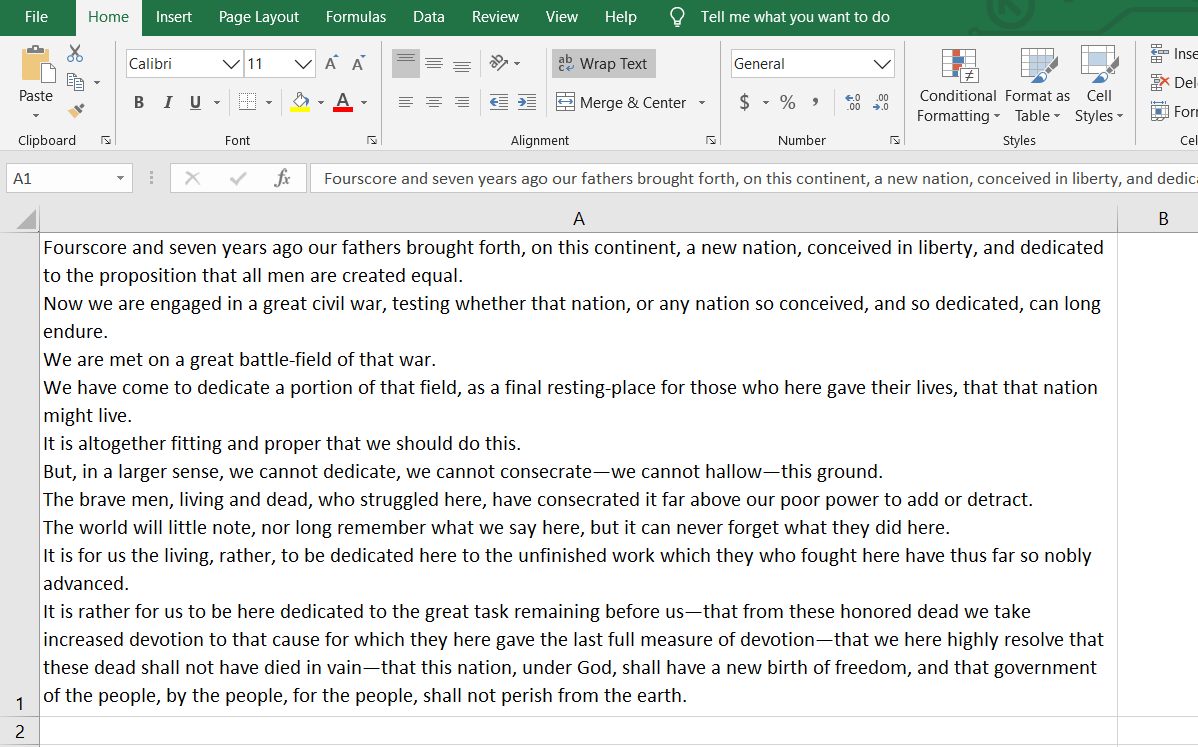
Now that you have a bigger column – wrap your text. Click in the cells (or an entire row or column) where you want to display your text. Then click on the Wrap Text button on the Home ribbon.

Or you can right-click on the selection and choose Format Cells, pick the Alignment Tab, and check the option for Wrap Text, finish with OK.


Now – type away! Add as much content as you’d like to the cell. You will have a big blob of text. To improve its readability – insert line breaks in the cell. Line breaks make dense information easier to digest by making it easier to read.

When you’re at a point where you’d like to start a new line, simply press [Alt] + [Enter].

insert line breaks in the cell
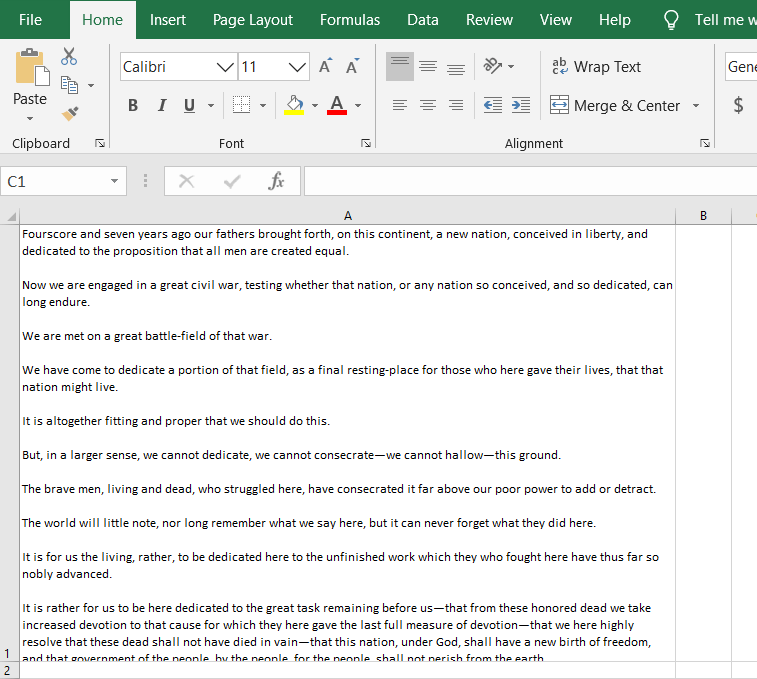
Want to add a blank line to create paragraphs in your cell? Press [Alt] + [Enter] twice.

insert paragraph breaks in the cell

Add bullet points to an Excel cell

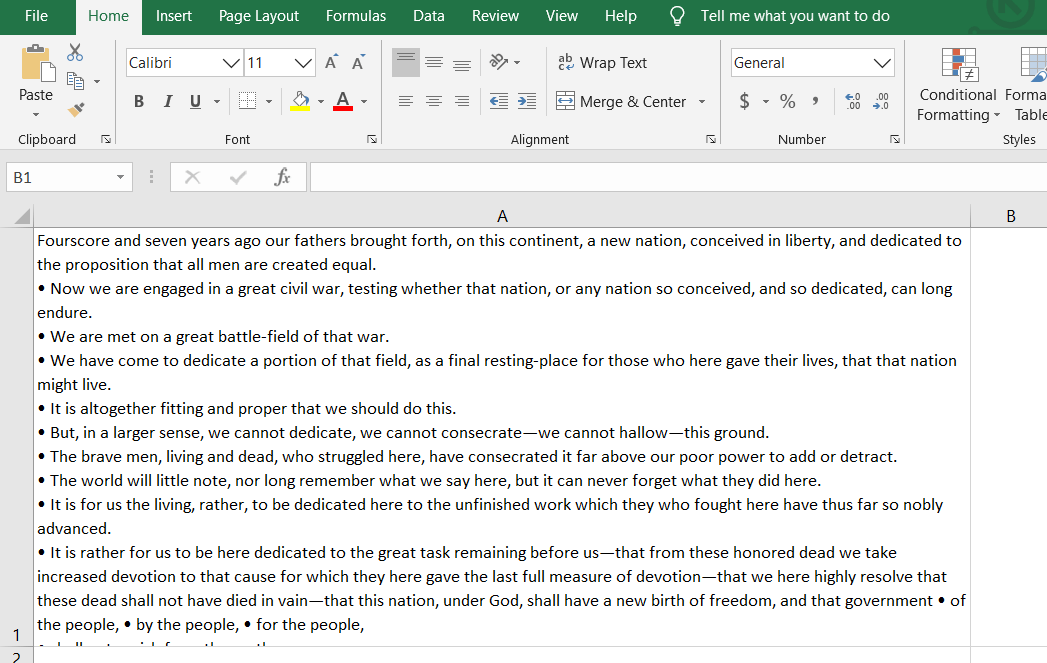
You can also add bullet points in an Excel cell. Bullet points are a great way to concisely convey important pieces of information or instructions. You can easily add bullet points to any cell in Excel spreadsheets.

  1. Double-click on the cell you want to add the bullet to.
  2. Position the cursor at the point that you want to insert a bullet.
  3. Hold down the Alt Key and type 0149 from the numeric keypad.
  4. A bullet appears.

insert bullet points in the cell

With these easy steps, you can make Microsoft Excel dance for you.

rb-

This is for Windows users – Mac users – your mileage may vary on some of these tips and tricks – but it should be doable.

The transcript of President Lincoln’s Gettysburg address is courtesy of Cornell University.

Stay safe out there!

Related article


Ralph Bach has been in IT long enough to know better and has blogged from his Bach Seat about IT, careers, and anything else that catches his attention since 2005. You can follow him on LinkedInFacebook, and Twitter. Email the Bach Seat here.

Pop-Up Ads – Tripod’s Revenge

Pop-Up Ads - Tripod's RevengeDo you remember Tripod? Founded in 1995, Tripod was a pioneer in the user-generated content market, now dominated by Mark Zuckerberg and Facebook. When you signed up for a Tripod account you could create a free website with all kinds of totally cool HTML 2.0 tricks like blink and marquee and it introduced pop-up ads.

Tripod was one of the original web destinations, including GeoCities and Angelfire trying to build online communities. Like all web properties, the site struggled to monetize the site. At first, the site relied on banner ads to fund the site. Banner ads were pioneered in 1994 by Hotwired (a long-gone online addition to Wired magazine). Even in the 1990s, online advertising was not popular.

Tripod site

The banner ads got in the way of the content. Advertisers were not always happy with the pages their banners appeared on. Tripod’s advertising methods changed when, as internet lore recalls, a big car manufacturer was not happy about their ad displaying on a page about sodomy that Tripod was hosting.

Tripod invented pop-up ads

code that would open the ad in a separate window

Ethan Zuckerman, one of the original Tripod employees, came up with a solution. He hacked together some code that would open the ad in a separate window. In 1996 he designed a vertically-oriented pop-up window that included navigation tools and an ad for inclusion on web pages.

The separate window would pop up and display promotional content in a new individual browser window that appeared on top of the active browser window. Mr. Zuckerman’s pop-up ad has been adapted and used across all OS’s screens. Mr. Zuckerman says his hack was intended to be less intrusive than inserting an ad into the middle of a user’s homepage.

The “innovation” took off. Pop-ups became one of the most hated forms of online advertisement. Occasionally pop-up ads can be useful – most of the time they are annoying, Some pop-up ads can be dangerous. No matter what the marketers call them, pop-up, pop-under, exit-overlays, exit-intent, click-activated, etc. – nearly 3/4’s of users told Hubspot they dislike “Online pop-ups.”

People’s hate pf pop-ups lead to the development of pop-up blockers. In 2002 Henrik Sørensen published the first pop-up blocker Adblock. The EFF reports that as of the end of 2018, ad blocking software had roughly 200 million daily active users.

Mr. Zuckerman, now at MIT, offered an apology for his role in what the pop-up has become. He wrote, “I’m sorry. Our intentions were good”. He believes that “advertising is the original sin of the web.”

rb-

Website marketers are preventing their customers from viewing content if they're using an ad blocker.

The pop-up battle which started in 1996 is escalating. Website marketers are fighting back. They are preventing their customers from viewing content if they’re using an ad blocker. Despite reports that 74% of AdBlock users say that they leave websites when they encounter such an ad block wall.

Stay safe out there!

Related article


Ralph Bach has been in IT long enough to know better and has blogged from his Bach Seat about IT, careers, and anything else that catches his attention since 2005. You can follow him on LinkedInFacebook, and Twitter. Email the Bach Seat here.

Agile is Not for Everyone

Agile is Not for EveryoneThe agile manifesto was published almost 20 years ago. The publishers of the agile manifesto looked to overthrow previous project management methodologies. The agile manifesto authors cast away what they considered burdensome. They looked to eliminate contracts, plans, and documentation. Along the way, agile became the latest consultant-speak to solve any firm’s problems.

Agile has morphedOver the years Agile has morphed into CI/CD, DevOpsExtreme Programming, Kanban, Lean, SAFe and more buzzwords. The top agile methods employed by organizations include scrum (54%), scrum/XP Hybrid (10%), custom hybrid (14%), scrumban (8%), and kanban (5%).

Agile is a blanket term for a set of methodologies that emphasize collaboration within tightly-knit teams, iterative development, early delivery, continuous improvement, and the ability to respond rapidly to changing requirements. Despite these lofty goals some argue that agile has become as dogmatic as the predecessors it sought to overthrow.

Backlash against agile

Agile is a blanket termRecent signs are pointing to a possible backlash against agile. California-based IT research firm Computer Economics reports that the growth in agile development is starting to taper off. Adoption was flat year over year, and we may be closing in on the ceiling for agile.

In their report, Agile Development Adoption and Best Practices, Computer Economics found that 60% of survey respondents practiced agile development in 2019, the same amount as practiced in 2018. In 2015, only 49% practiced agile, and that figure rose steadily until 2018.

David Wagner, senior director of research for Computer Economics concluded:

Most software developers will tell you that agile is the only way to develop software … However, when requirements are fairly stable and well-understood, a more traditional development approach may be best. Also, agile works best when developers can be assigned to single projects over a longer period of time which is not always possible, especially in smaller companies.

rb-

agile might not be right for them.Computer Economics concludes that Agile is an important tool for organizations with high-level development needs, such as software and cloud providers. However, for most enterprises that do little custom development, agile might not be right for them.

Corporate IT organizations that have not already adopted Agile are expected to slow in adapting it in the future. KPMG found (PDF) that 63% of business leaders claim that the maturity of agile project management is lower than that of traditional project management.

I always like to follow the money because it leads to interesting places. Here are some factoids around Agile. The project management software market size is projected to reach $6.68 billion by 2026.

If we take these factoids together by 2026

  • MSFT is set to bring in $1.8B in project management software by 2026.
  • TEAM is set to bring in $1.7B in project management software by 2026.
    • Jira – set to bring in nearly $1.3B
    • Trello -will bring in nearly $380M

planned obsolescence trainSo following the money, it is very likely that intentional obfuscation on the part of corporate marketing machines at MSFT and TEAM to drive changes to PM methodologies in order to keep everyone on the planned obsolescence train and have to update PM and PPM software every year to match the latest agile methodology.

Stay safe out there!

Related article


Ralph Bach has been in IT long enough to know better and has blogged from his Bach Seat about IT, careers, and anything else that catches his attention since 2005. You can follow him on LinkedInFacebook, and Twitter. Email the Bach Seat here.

Artificial Intelligence on the Throne

Artificial Intelligence  on the ThroneThe Internet of Things (IoT) is covering the world with all kinds of devices for the home and industry. Tech prognosticator IDC estimates that by 2025 there will be 41.6 billion IoT devices. The market research firm predicts the IoT devices will dump 79.4 zettabytes (ZB) of data. One class of IoT device for the home has gotten a major upgrade from California’s Stanford. Stanford University medical researchers have created a smart toilet by adding artificial intelligence to the throne. Before Stanford, the smart toilet was often the butt of jokes. The “smart toilet” offered ambient colored lighting, wireless Bluetooth music sync, heated seats, foot warmers, and automatic opening and closing lids. All nice but not really smart. The Stanford Precision Health Toilet (advanced Smart Toilet for healthcare) is really smart it can diagnose diseases. 

Artificial intelligence on the toilet

The Stanford Precision Health Toilet project led by Lead author, Seung-min Park, Ph.D., published A mountable toilet system for personalized health monitoring via the analysis of excreta.” In the journal Nature Biomedical Engineering, they describe a toilet designed to detect early warning signs of cancer and other diseases. The Stanford team believes it will be useful for people at an increased risk of developing certain health issues. Dr. Gambhir – a Ph.D., Stanford professor, chair of radiology, and the senior author of the research paper says that currently, the toilet can measure 10 different biomarkers. The device is fitted inside a regular toilet bowl and is connected to an app for evaluation. Dr. Gambhir envisions it as part of an average home bathroom. The sensors would be an add-on that’s easily integrated into “any old porcelain bowl.” Stanford Precision Health Toilet The extra-smart toilet uses cameras and test strips to collect number one and number two samples. It then analyzes both your pee and poo with artificial intelligence to generate diagnosesa trend in the medical industry. Stanford News says the smart toilet’s algorithms “can distinguish normal ‘urodynamics.’ Urodynamics is the flow rate, stream time, and total volume, among other parameters of urine. The Smart toilet can also check “stool consistencies from those that are unhealthy.analyze white blood cell countChanges in urine can reveal multiple disorders. The dipsticks can be used to analyze white blood cell count, consistent blood contamination. Certain levels of proteins, that can signify bad things. Including a spectrum of diseases, including infection, irritable bowel syndrome, kidney failure, bladder cancer, and prostate cancer.

A very unique biometric factor

The toilet’s built-in identification system uses fingerprints and analprints to identify users in order to match users to their data. Apparently, analprints turn out to be unique biometric factor like fingerprints or iris prints. Professor Gambhir said, “We know it seems weird, but as it turns out, your anal print is unique.” Stanford says no human will see you analprint biometric data. If the artificial intelligence detects something questionable the smart toilets’ app would alert the user’s healthcare team to conduct a full diagnosis and further tests. researchers are planning upgradesThe researchers are planning upgrades to the Precision Health Toilet. Mr. Park told The Verge the upcoming number two version of the toilet will help detect tumor DNA and viral RNA to help them track the spread of diseases like COVID-19. Dr. Gambhir told NakedSecurity his team is working to customize the toilet’s tests to fit a user’s individual needs. For example, a diabetic’s smart toilet could monitor glucose in the urine. Or if a person with a family history of bladder or kidney cancer could benefit by having a smart toilet that monitors for blood. The Stanford researchers tested the toilet and more than half of their pilot test subjects were comfortable using the extra-smart toilet. 37% were “somewhat comfortable.” 15% were “very comfortable” with the idea of “baring it all in the name of precision health.rb- Salvador DaliUsing analprints to match your poo with you is based on “work” by 20th-century surrealist painter Salvador Dali. Stanford’s Gambhir pointed out in an interview with Bioengineering that Dali studied anal creases for his unconventional erotic art (NSFW). Dr. Gambhir’s assurances that the health data would be stored with “privacy protections” in “secure, cloud-based systems.” Followers of the Bach Seat know that cloud-based systems is also known as “somebody else’s computer.” That sounds like a bad idea. We know cloud-based storage can be very leaky. And healthcare systems have come under increased attack during the COVID pandemic. The Feds could track people around coming and goingAnother problem with the ultra-smart toilet. When the FBI gets hold of this data, they could literally be up in everybody’s business. The Feds could track people around the world coming and going by adding analprints to their massive facial recognition surveillance database. Dr. Gambhir is quoted by NakedSecurity, 

We have taken rigorous steps to ensure that all the information is de-identified when it’s sent to the cloud and that the information – when sent to health care providers – is protected under [HIPAA],… 

NakedSecurity points out that time and time again Big Data can be dissected, compared, and contrasted to draw inferences about individuals. In other words, it’s not hard to re-identify people from anonymized records, be they records pertaining to location tracking, faceprints, or now-anuses. Dr. Gambhir reminds us all that while the Stanford Precision Health ultra-smart Toile has clear benefits as a diagnostic tool, it should not be a replacement for a doctor.

Stay safe out there!

Related article   Ralph Bach has been in IT long enough to know better and has blogged from his Bach Seat about IT, careers, and anything else that catches his attention since 2005. You can follow him on LinkedInFacebook, and Twitter. Email the Bach Seat here.