Tag Archive for MSFT

What You Need to Know About Blue Light on Your Screens

What You Need to Know About Blue Light on Your Screens CNN reports that Americans spent up to seven hours and 22 minutes on screens each day in 2019— not including screens used for school work.  That was before the pandemic, which pushed people’s social lives onto Zoom video chats.  There are risks in all that screen time.  One common concern is the blue light that emanates from digital devices.

PrismAll visible light falls on a color spectrum based on the wavelength frequency and energy levels each color produces.  Blue light is a short wavelength, high-energy, visible (HEV) light.  Darker colors, like blue, are the closest to more dangerous UV wavelengths and strength.  Lighter colors, like red, are on the opposite end of the spectrum, with longer wavelengths and lower energy levels.

Light spectrum

Blue light can be harmful.

Blue light can be harmful, like too much salt in our diet.  Our bodies are naturally adept at absorbing and dealing with blue light exposure, but too much can be harmful.

We are surrounded by blue light in our natural environment our whole life.  We tend to only worry about blue light coming from display screens.  It also comes from:

  • Naturally, from the sun,
  • Fluorescent lights, and
  • LED light bulbs.

LED RGB pixelsMost computer monitors, cell phone screens, and flat-screen TVs are additional sources of blue light.  HP explains this is because white light LEDs combine with blue LEDs to create a solid-state light that uses significantly less energy and power than alternative light sources, making it ideal for electronic devices.  It These digital devices cause excess blue light exposure, and there are concerns.

Our skin doesn’t have much of a problem dealing with blue light, but our eyes don’t have the same level of adaptation.  Because the wavelength of blue light is short and powerful, it can penetrate past the cornea to reach the retina, which is the most light-sensitive part of your eye.

Digital eye strain

Parts of the eyeOne of the most common side effects of blue light exposure is digital eye strain, also known as computer vision syndromeIt is caused by staring at a computer screen for too long and may lead to dry, sore, red eyes and blurred vision.  HP warns that with prolonged exposure, blue light can harm your eyes and lead to macular degeneration.

You can take some easy steps to avoid permanent damage to your eyesight.  Here are several suggestions to control your blue light exposure.  Our bodies are naturally conditioned and programmed to fall asleep when it gets dark and wake up when exposed to light.  Harvard Medical School found that it is essential to limit your screen time because blue light suppresses melatonin for about twice as long as green light and shifts circadian rhythms by twice as much.

The same Harvard study found that green light may be as hard on your eyes as blue light.  The researchers warn that the two lights are similar in strength, and there are few remedies for green light exposure.  Limiting screen time—even if you use a blue light filter is important. 

Get your eyes checkedIt’s not just blue light that can affect your vision.  As we age, the lens inside our eye can lose flexibility, resulting in the inability to change focus from far to near.  Regular comprehensive eye exams are important to maintaining eye health, no matter how much time you spend in front of screens.

If you already have prescription glasses, move to multi-focal lenses and have your optometrist add a blue light filter.  If not, “cheaters” from the drugstore may be enough—for a while. 

Blinking

Blinking is our body’s natural defense.  It lubricates and cleans our eyes.  Typically, we blink 10 to 20 times per minute.  However, studies have shown that our blink rate drops when we concentrate.  We only blink 3 to 8 times per minute when reading, watching TV, or looking at a computer screen.  Dry eyes are irritated eyes. 

Take time to rest your eyes every 20 minutes.  Look away from the computer and focus on something distant—like out a window.

  1. the average person blinks 10 to 20 times per minuteClose your eyes gently,
  2. Squeeze and hold them shut for a moment,
  3. Open and relax them.

Remember to blink more often in between, and when you are thinking, instead of squinting at the screen, turn away and blink a few times. 

A blue light filter can be a physical barrier or an application that blocks out blue light.  Physical blue light filters block short, high-frequency waves and allow long, low-frequency ones.  HP says physical blue light screen filters are the easiest and best way to reduce your blue light exposure.  Some are just a clear piece of plastic material that covers your monitor. 

Blue light filtering glasses

blue light filtering glassesWearing blue light-filtering glasses for 3 to 4 hours before bedtime is the easiest way to keep your melatonin levels in check and your retinas protected.  An inexpensive over-the-counter pair online can cost $10.00 and up to $80.00.  The original Blue Blockers cost $19.95 back in the day.

Many prescription and over-the-counter cheaters have blue light filters in the lenses.  However, if you regularly wear prescription glasses, investing in a physical blue light filter may be a waste of money.

Windows 10

You can also reduce your blue light exposure by adding an app to many of your digital devices.  Microsoft (MSFT) Windows 10 has a built-in Night Light feature to control blue light.  To use Windows 10’s app:

  1. Microsoft logoClick the Start button,
  2. Go to Settings,
  3. System,
  4. Display,
  5. Toggle the Night light switch to turn the feature on.
  6. Click the link for Night light settings where you can:
    • Set a schedule that controls the lighting on your computer screen,
    • Setting the screen temperature allows you to adjust the levels of blue light reduction.  Warmer colors filter out more blue light—experiment with settings to see what works best for you.

Apple

If you are an Apple (AAPL) Mac user, Apple’s built-in blue light filter app Night Shift requires macOS Sierra 10.12.4 and specific systems.  If you can, follow these steps to enable Night Shift:

  1. Apple logoChoose the Apple menu,
  2. System Preferences,
  3. then click Displays,
  4. Click the Night Shift tab.

On your Apple iPhone or iPad, go to

  1. Settings,
  2. Display & Brightness,
  3. Tap the Night Shift setting. 

As with all things Google (GOOG) Android, the availability of a built-in blue light filter depends on your specific device and version of Android.  To see if this feature is on your Android device, go to:

  1. Goggle Android logoSettings,
  2. Display,
  3. Look for an option for a Night Light or Blue Light filter. 

If your Android does not have a blue light filter, consider using Grayscale mode, an accessibility setting for most smartphones.

F.lux is a popular third-party blue light filter application with apps for Windows, Apple, Linux, and Phillips Hue lighting system apps. 

rb-

Please be aware that all these blue light blocker apps require you to turn on Location Services to get the automatic schedule.

Blue light-blocking apps can diminish the quality of your viewing experience.  HP says that compared to blue light filter applications and physical blue light blockers, physical devices diminish picture quality and color far less than apps.

Try one of these solutions to save yourself the discomfort and strain caused by blue light.

Stay safe out there!

Related article


Ralph Bach has been in IT long enough to know better and has blogged from his Bach Seat about IT, careers, and anything else that catches his attention since 2005.  You can follow him on LinkedInFacebook, and Twitter.  Email the Bach Seat here.

No More Facial Recognition From IBM

Updated 06/19/2020 – Redmond is reporting that the ACLU has uncovered evidence (PDF) that Microsoft was pursuing sales of its facial recognition technology after its vow to stop selling the software. The ACLU says Microsoft continued to pursue sales to the U.S. Drug Enforcement Administration (DEA) six days after the announcement. Microsoft president Brad Smith claimed the firm would stop selling facial recognition tech to U.S. police agencies until there is a national law in place that’s “grounded in human rights.”

The article calls MSFT’s Smith’s “stand” last week “as a bit hollow or misleadingly narrow” and “opaque transparency.”

Updated 06/12/2020 – CNN is reporting that Microsoft has fallen in line with IBM and Amazon. It has announced it will not sell facial recognition technology to police departments in the United States, at least until there is a federal law to regulate the technology.

Following IBM’s stand, Amazon has announced it will stop providing its facial recognition technology to police forces for one year.  TechCrunch makes the point that the Amazon announcement did not say if the moratorium would apply to the federal government. Amazon also did not say in the statement what action it would take after the yearlong moratorium expires.

Both firms are calling for national regulation of the tech. As I predicted below.

No More Facial Recognition From IBMIBM has made a step in the right direction in the fight against structural racism. IBM CEO Arvind Krishna sent a letter to the U.S. Congress citing concerns that artificial intelligence (AI) facial recognition software could be used for mass surveillance and racial profiling. As a result, IBM will no longer sell general-purpose facial recognition or analysis software.

IBM facial recognition changes

The company is not abandoning facial recognition. Reuters cites an IBM source that says, IBM will “no longer market, sell or update the products but will support clients as needed.” As Engadget points out, the move comes in the midst of protests over police brutality and discrimination capped by the apparent murder of George Floyd by Minneapolis police officers.

The use of AI and facial recognition has a history of privacy and bias problems. In 2019, Pew Research reported that  50% of U.S. adults said they did not trust tech companies to use facial recognition responsibly. 27% of the same group did not trust law enforcement agencies to use facial recognition responsibly. There are good reasons for the distrust of facial recognition. Many reports have found that facial recognition systems can be biased. They have systemic bias’ against non-whites and women. This is particularly true if the training data includes relatively few people from those groups. 

The Verge documents some of the defacto bias’ in facial recognition. In 2018, AI researchers Joy Buolamwini and Timnit Gebru, Gender Shades project was the first to reveal the extent to which many commercial facial recognition systems (including IBM’s) were biased. This work led to mainstream criticism of these algorithms and ongoing attempts to address bias.

Clearview AI Inc., facial recognition software identifies people by comparing their faces with 3 billion images many scraped from social media sites. Clearview took the images from Facebook, YouTube, and Venmo without notifying the people. The facial recognition tool is widely used by private sector companies and law enforcement agencies. Clearview has since been issued numerous cease and desist orders and is at the center of a number of privacy lawsuitsFacebook was also ordered in January 2020 to pay $550 million to settle a 2015 class-action lawsuit over its unlawful use of facial recognition technology.

The Verge points out that IBM is not without a share of the blame. IBM was found to be sharing a training data set of nearly one million photos in January 2019 taken from Flickr without the consent of the subjects. IBM told The Verge in a statement at the time that the data set would only be accessed by verified researchers and only included images that were publicly available. The company also said that individuals can opt out of the data set.

A December 2019 NIST study found:

empirical evidence for the existence of a wide range of accuracy across demographic differences in the majority of the current face recognition algorithms that were evaluated.


Amazon’s facial recognition software 

Notably, NIST’s study did not include Amazon’s facial recognition software Rekognition. Rekognition, has also been criticized for its accuracy. In 2018, the ACLU found that Rekognition incorrectly matched 28 members of Congress to faces picked from 25,000 mugshots.

Despite Amazon’s system providing what the ACLU called a disproportionate number of false matches of congress embers of color, Amazon posted a statement expressing concern over the “inequitable and brutal treatment of Black people in our country.” But the richest man in the world Jeff Bezos and his company are part of the problem. Amazon is profiting off racial profiling of Black people by police.

Amazon has built a nationwide surveillance network. The surveillance network of our homes and communities uses Amazon Ring cameras and its Neighbors app. The company collects the images and then handed its data over to the police. 

What Amazon does with the data:

rb-

Mr. Krishna should be applauded for his public stand. But call me cynical – this is also about business. Morgan Stanley predicts that AI and automation will be a one trillion dollar industry by 2050. Change is coming and big tech – IBM, MSFT, GOOG, FB are trying to get in front of it. The titans are pushing for reform – not abolition for two reasons.

First, they want to use new regulations as a barrier to entry into this market. They want to upstarts like Clearview AI and 45+ other small to multi-national firms who may have new ideas out of the $1T market.

Second – Big tech knows they can buy the politicians in DC cheaper than having to fight off regulations in 50 different states. Big business has done this time and again. they will sit in front of a congressional hearing – say mea culpa and maybe Congress will pass some lame regulation that the lobbyist wrote. Nothing will change because there is too much money on the table to do the right thing to stop the structural racism that led to George Floyd’s death.

Stay safe out there!

Related article


Ralph Bach has been in IT long enough to know better and has blogged from his Bach Seat about IT, careers, and anything else that catches his attention since 2005. You can follow him on LinkedInFacebook, and Twitter. Email the Bach Seat here.

Make Excel Dance

Make Excel DanceI was working with a newish Project Manager the other day and we were building a data collection tool to log some intermittent errors and she was fussing about how to build the tool to get data. Should she email a Word form to the team? I finally asked her what’s wrong with Excel?

I suggested she build the form in Excel, post it up to SharePoint, that way everybody on the team has access to the same document and you don’t have to tease the data out of 50 different emails.

You know Bob the Boss likes clear directions with bullet points on his forms and you can’t do that with Excel.

Say what? – Well newbie you can make pretty text in Excel.  Here’s how…..

Use the right font

WMicrosoft Excelhen you have a lot of information to present – the temptation might be to use a small font  –  don’t people will ignore it if they can’t read it. When it comes to choosing the best font for displaying both text and numbers, the font you choose matters.

From a readability point of view, the Times New Roman font is considered to be easier and faster to read compared with other fonts. Times New ­Roman is a serif typeface introduced in 1932 by the British newspaper The Times. The Times New Roman font’s serif design makes reading easier because the characters are more recognizable. But styles evolve over time:

  • Times New Roman font was fashionable in the 1970s;
  • The Helvetica font was the go-to font in the 1980s;
  • The Arial font was dominant during the 1990s;
  • The Verdana font was widely adopted in the 2000s:
  • The Calibri font is widely used today.

Microsoft (MSFT) introduced Calibri with Windows Vista in 2006. It is basically a skinnier version of the Arial font. The Calibri font was specifically engineered to be highly legible for both alphabet and numerical characters on today’s smaller handheld devices.

Now that you have made a good choice for your font use it. The Font list is on the Home ribbon- Click font and select the font you want to use. (No Wing Dings or anything that starts with Gothic right?)


Break up the text

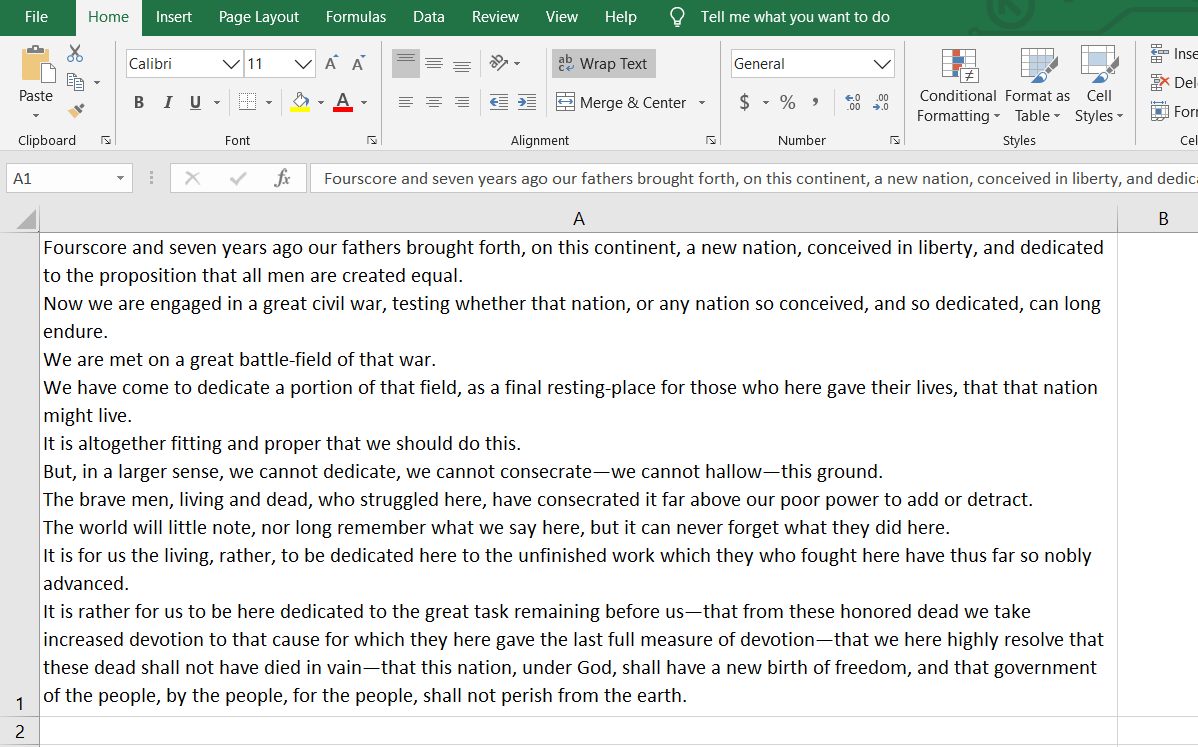
When you have a lot of information to explain about a certain task, it’s helpful to include a few paragraphs in one cell. By default, a bunch of text in a cell is truly unreadable. But – you can make Excel display pretty paragraphs.

First your need to expand the column width. The column width will determine how many lines are needed to display the text. Use one wide column rather than multiple rows for lengthy text entries for greater readability and for any lists of data.

To expand the column width put your cursor on the cell boundary and left click on your mouse and drag your column out. Don’t worry about the final column width yet – you can adjust it again and again and again.

Now that you have a bigger column – wrap your text. Click in the cells (or an entire row or column) where you want to display your text. Then click on the Wrap Text button on the Home ribbon.

Or you can right-click on the selection and choose Format Cells, pick the Alignment Tab, and check the option for Wrap Text, finish with OK.


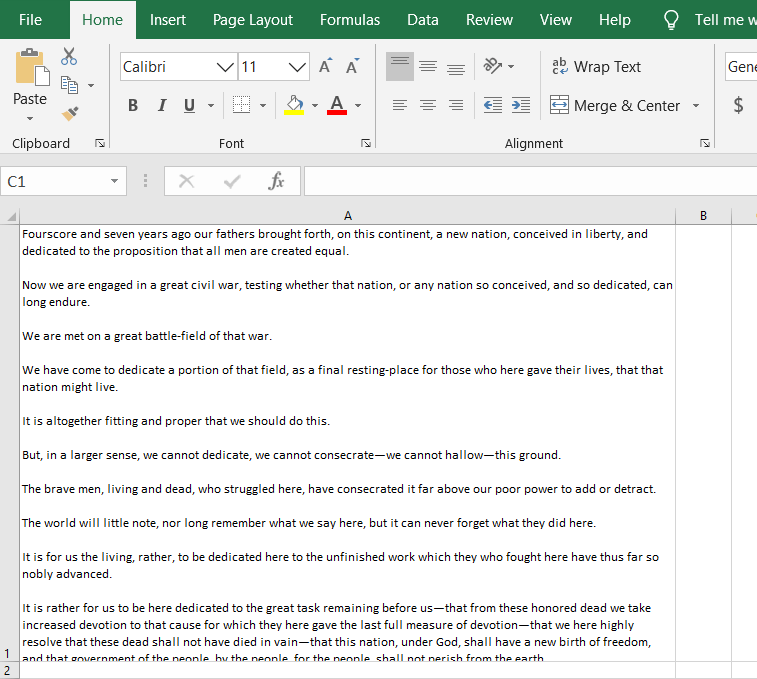
Now – type away! Add as much content as you’d like to the cell. You will have a big blob of text. To improve its readability – insert line breaks in the cell. Line breaks make dense information easier to digest by making it easier to read.

When you’re at a point where you’d like to start a new line, simply press [Alt] + [Enter].

insert line breaks in the cell
Want to add a blank line to create paragraphs in your cell? Press [Alt] + [Enter] twice.

insert paragraph breaks in the cell

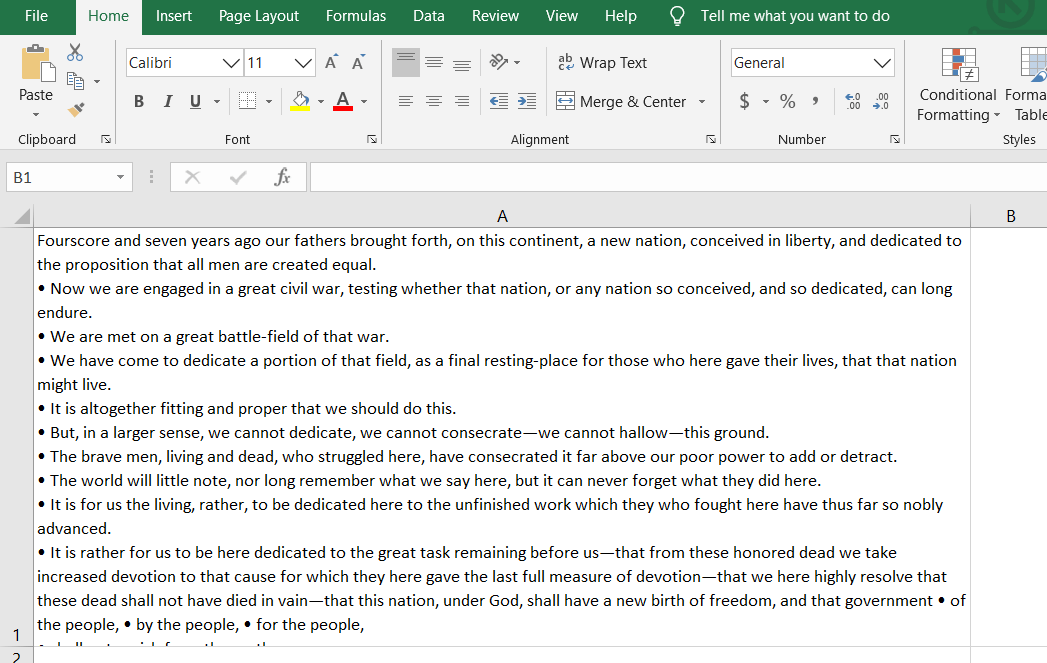
Add bullet points to an Excel cell

You can also add bullet points in an Excel cell. Bullet points are a great way to concisely convey important pieces of information or instructions. You can easily add bullet points to any cell in Excel spreadsheets.

  1. Double-click on the cell you want to add the bullet to.
  2. Position the cursor at the point that you want to insert a bullet.
  3. Hold down the Alt Key and type 0149 from the numeric keypad.
  4. A bullet appears.

insert bullet points in the cell

With these easy steps, you can make Microsoft Excel dance for you.

rb-

This is for Windows users – Mac users – your mileage may vary on some of these tips and tricks – but it should be doable.

The transcript of President Lincoln’s Gettysburg address is courtesy of Cornell University.

Stay safe out there!

Related article


Ralph Bach has been in IT long enough to know better and has blogged from his Bach Seat about IT, careers, and anything else that catches his attention since 2005. You can follow him on LinkedInFacebook, and Twitter. Email the Bach Seat here.

Agile is Not for Everyone

Agile is Not for EveryoneThe agile manifesto was published almost 20 years ago. The publishers of the agile manifesto looked to overthrow previous project management methodologies. The agile manifesto authors cast away what they considered burdensome. They looked to eliminate contracts, plans, and documentation. Along the way, agile became the latest consultant-speak to solve any firm’s problems.

Agile has morphedOver the years Agile has morphed into CI/CD, DevOpsExtreme Programming, Kanban, Lean, SAFe and more buzzwords. The top agile methods employed by organizations include scrum (54%), scrum/XP Hybrid (10%), custom hybrid (14%), scrumban (8%), and kanban (5%).

Agile is a blanket term for a set of methodologies that emphasize collaboration within tightly-knit teams, iterative development, early delivery, continuous improvement, and the ability to respond rapidly to changing requirements. Despite these lofty goals some argue that agile has become as dogmatic as the predecessors it sought to overthrow.

Backlash against agile

Agile is a blanket termRecent signs are pointing to a possible backlash against agile. California-based IT research firm Computer Economics reports that the growth in agile development is starting to taper off. Adoption was flat year over year, and we may be closing in on the ceiling for agile.

In their report, Agile Development Adoption and Best Practices, Computer Economics found that 60% of survey respondents practiced agile development in 2019, the same amount as practiced in 2018. In 2015, only 49% practiced agile, and that figure rose steadily until 2018.

David Wagner, senior director of research for Computer Economics concluded:

Most software developers will tell you that agile is the only way to develop software … However, when requirements are fairly stable and well-understood, a more traditional development approach may be best. Also, agile works best when developers can be assigned to single projects over a longer period of time which is not always possible, especially in smaller companies.

rb-

agile might not be right for them.Computer Economics concludes that Agile is an important tool for organizations with high-level development needs, such as software and cloud providers. However, for most enterprises that do little custom development, agile might not be right for them.

Corporate IT organizations that have not already adopted Agile are expected to slow in adapting it in the future. KPMG found (PDF) that 63% of business leaders claim that the maturity of agile project management is lower than that of traditional project management.

I always like to follow the money because it leads to interesting places. Here are some factoids around Agile. The project management software market size is projected to reach $6.68 billion by 2026.

If we take these factoids together by 2026

  • MSFT is set to bring in $1.8B in project management software by 2026.
  • TEAM is set to bring in $1.7B in project management software by 2026.
    • Jira – set to bring in nearly $1.3B
    • Trello -will bring in nearly $380M

planned obsolescence trainSo following the money, it is very likely that intentional obfuscation on the part of corporate marketing machines at MSFT and TEAM to drive changes to PM methodologies in order to keep everyone on the planned obsolescence train and have to update PM and PPM software every year to match the latest agile methodology.

Stay safe out there!

Related article


Ralph Bach has been in IT long enough to know better and has blogged from his Bach Seat about IT, careers, and anything else that catches his attention since 2005. You can follow him on LinkedInFacebook, and Twitter. Email the Bach Seat here.

Why CTRL + ALT + DELETE

Why CTRL + ALT + DELETEEvery PC user has given their computer the three-finger salute as it locked up – frequently at the most inopportune time. But why CTRL + ALT + DELETE? Turns out the three-finger salute was a 10-minute hack to make programmers life easier. The CTRL + ALT + DELETE was born at IBM (IBM) in the early 1980s.

IBM PCProject Acorn was the code name for the rush project to build IBM’s new personal computer – because Apple (AAPL) and RadioShack were already selling small stand-alone computers. David Bradley was part of the team working from the IBM offices in Boca Raton, FL on the IBM PC.

Mental Floss reports that the programmers’ working on the IBM PC had to manually restart the entire system whenever the computer encountered a coding glitch. This was a waste of time. Mr. Bradley told Mental Floss,  “Some days, you’d be rebooting every five minutes as you searched for the problem … The tedious tests made the coders want to pull their hair out.

IBM logoMr. Bradley worked on everything from writing input/output programs to troubleshooting wire-wrap boards on Project Acorn. In order to placate the programmers, Mr. Bradley created a hack. His hack was a keyboard shortcut that triggered a system reset without memory tests.

To Mr. Bradley CTRL + ALT + DELETE, was just another item to tick off his to-do list. He says. “It was five minutes, 10 minutes of activity, and then I moved on to the next of the 100 things that needed to get done.

The engineer chose the keys by location—with the DEL key across the keyboard from the other two, it seemed unlikely that all three would be accidentally pressed at the same time. Mr. Bradley never intended to make the shortcut available to customers, nor did he expect it to become a cultural icon. It was meant for his fellow coders, for whom every second counted.

Thank IBM for CTRL + ALT + DELETE

The IBM team managed to finish Acorn on schedule. In the fall of 1981, the IBM PC hit the market. It was a dull gray box beneath a green screen monitor. Marketers predicted that the company would sell less than 50,000 units a year. IBM execs thought that estimate was too optimistic. They were all wrong. Computing would never be the same.

Statista Percent of US households with a computer 1984 - 2016

As PC sales took off – few users were aware of Mr. Bradley’s shortcut hidden in their machines. That changed in the early 1990s when Microsoft’s (MSFT) Windows 3 took off. Now Microsoft’s Windows PCs were crashing and the infamous “blue screen of death” plagued Windows users. A quick fix to the BSOD spread by word of mouth (this was before the WWW) – CTRL + ALT + DELETE. Suddenly, Mr. Bradley’s quick hack was a big deal.

At an event celebrating the 20th anniversary of the IBM PC industry big-wigs gathered for a panel discussion. Mental Floss says that the first question to the panel bypassed Microsoft chairman Bill Gates and was for David Bradley. Mr. Bradley, who has always been surprised by how popular his CTRL + ALT + DELETE hack made him, was quick to deflect the glory. The programmer joked;

I have to share the credit, I may have invented it, but I think Bill made it famous.

rb-

Bill Gates has publicly admitted that CTRL + ALT + DELETE was a mistake – but the company he founded continues to use Mr. Bradley’s hack. In Windows 10  the keyboard combination starts Windows Security, which lets you lock the computer, switch to a different user, log off, start Task Manager, or shut down/reboot the computer.

Stay safe out there!

Related article


Ralph Bach has been in IT long enough to know better and has blogged from his Bach Seat about IT, careers, and anything else that catches his attention since 2005. You can follow him on LinkedInFacebook, and Twitter. Email the Bach Seat here.