
Tag Archive for Android

IPv6 Compromise Smartphones Users’ Privacy

IPv6 Compromise Smartphones Users' PrivacyNow that the IPv4 address pool is depleted and the IPocalypse is at hand, wrinkles are emerging in IPv6.  One of the wrinkles is with mobile devices. Most of the cool mobiles devices have been able to handle IPv6 for a while. Apple’s (AAPL) iPhones, iPads, and iPods have been capable of handling IPv6 Since version 4 of the iOS operating system and most Google (GOOG) Android devices have been capable since version 2.1. H  Security is reporting that these mobile operating systems send information about their users to the network.

Smartphone risksA device on an IPv6 network usually determines half of their address (the “interface identifier”) themselves, but H Security says that smartphones are sloppy with this task. According to the article, smartphones simply add the same two bytes to their globally unique MAC address and use it as their identifier. As a result, they transfer a unique hardware ID whenever they communicate with an IPv6-enabled server.

The basic problem isn’t an IPv6 issue because there are other methods for generating the address. The article says that a device can generate a random interface identifier and replace it on a regular basis. This is called the Privacy Extensions method and is the factory-set option in Windows; it can also be enabled in other operating systems. The article points out that devices running Apple’s iOS or Android offer neither the option to enable Privacy Extensions nor the option to disable IPv6, anyone who uses an affected device on an IPv6-enabled wireless network will send their ID.

IPocalypseThe only thing the smartphones are lacking is a control option in the user interface, as the Privacy Extensions do come as part of their kernel. For instance, on a (jailbroken) iOS 4 device with root access, they can be enabled with the same command that enables them on a desktop device running Mac OS X:

sysctl -w net.inet6.ip6.use_tempaddr=1

The blog claims the problem is only affecting a small number of users because IPv6 is not yet in widespread use. However, more ISPs plan to offer IPv6 in addition to the old IPv4 in the future. In addition, there are routers like the Cisco (CSCO) Linksys E3000, which will automatically set up an IPv6 connection via a 6to4 conversion when their internet access is purely IPv4.

The author concludes that the issue is particularly sensitive because such devices tend to be used by one specific person. As a result, the MAC address, which is accessible to any server operator and network monitor, allows this user to be identified.

rb-

If this sounds familiar, it is I wrote about mobile apps uploading  UDID’s here.

Ralph Bach has been in IT long enough to know better and has blogged from his Bach Seat about IT, careers, and anything else that catches his attention since 2005. You can follow him on LinkedIn, Facebook, and Twitter. Email the Bach Seat here.

What Happened to the Paperless Office?

What Happened to the Paperless Society?The Economist wonders whatever happened to the “paperless office”? Thirty years ago computers were hailed as the beginning of the paperless office era. In 1980 The Economist recommended that firms trying to improve productivity “reduce the flow of paper, ultimately aiming to abolish it”.

Unfortunately not many people listened to The Economist. Since they extolled the virtue of a paperless office, global paper consumption has increased by half.

Paper consumption

The average American uses almost six 40-foot trees a year in paper. Gizmodo says don’t feel too bad. The EU bureaucracy in Brussels pushed the Belgian paper consumption to a whopping 8.5 trees per person. The equivalent to four Rockefeller Center Christmas trees.

Paperless office research says

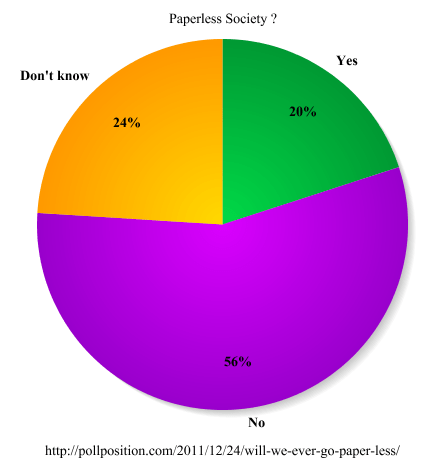
The trend will not change. A report from ITnewsLink reports that more than half of Americans think the U.S. will never go paperless. Pollster Poll Position conducted a national survey to see if Americans think the U.S. could ever be a paperless society.

Poll Position researchPoll Position’s research found that 56% of Americans said they don’t think the U.S. would ever be a paperless society. Only 20% said yes, one day we’ll all go paperless. 24% of Americans were undecided or had no opinion on the question.

Other Poll Position finding

  • 63% of the 18-29 age group said the U.S. would never be a paperless society and 23% said we could be a paperless society.
  • 56% of men and women said we could never be a paperless society.

You can still vote in their online companion poll.

rb-

I think that in an era of computers, Amazon (AMZN) Kindle Fire and Apple (AAPL) iPad tablet computers, iPhones and Google (GOOG) Android smartphones that paper consumption would decrease. Apparently it takes more than buzzwords like “paperless” and “green” to make a difference.

Related articles
  • The Paperless Office? (Going Green) (whattheythink.com)


Ralph Bach has been in IT long enough to know better and has blogged from his Bach Seat about IT, careers and anything else that catches his attention since 2005. You can follow him at LinkedInFacebook and Twitter. Email the Bach Seat here.

How Does Your Equipment Stack Up?

How Does Your Equipment Stack Up?Engadget points us to phone-size.com that lets you compare the relative proportions of different smartphones. At the top of the webpage, you’ll also find a toolbar to enter the size and aspect ratio of your display. Once you jump through this minor hoop, according to Engadget, the utility produces accurate, life-size depictions of smartphones like Apple’s (AAPL) iPhonesGoogle’s (GOOG) Androids, and Research In Motion’s (RIMM) Blackberrys.

rb-

Really wanted to use the title.

Related articles


Ralph Bach has been in IT long enough to know better and has blogged from his Bach Seat about IT, careers, and anything else that catches his attention since 2005. You can follow him on LinkedInFacebook, and Twitter. Email the Bach Seat here.
Top Wireless Predictions for 2012

Top 10 Wireless Predictions for '12 from Juniper ResearchUK-based Juniper Research published a year-end list of predictions for the mobile and wireless industry for 2012. A copy of the report can be downloaded from Juniper Research, with registration here. Are they on-target or off-the-wall?

Recession Likely to Hit Smart Device SalesRecession Likely to Hit Smart Device Sales. Juniper Research says the continued recession will hurt smartphone and tablet sales. They believe tablet sales will be hurt more than “must-have” smartphones.

They say cash-strapped consumers may opt for the lower-priced tablets. This could benefit players such as Amazon (AMZN) Kindle Fire or ARCHOS (ALJXR) ARNOVA branded devices rather than an Apple (AAPL) iPad. eReaders are most likely to be the hardest hit according to the report.

The Year of the Quad-Core Processor2012 – The Year of the Quad-Core Processor. ASUS (2357) was the first to release Quad-Core Processor. The new chip appeared n November 2011, It ran on the Eee Pad Transformer Prime with the newly launched NVidia (NVDA) Tegra 3 chip. Qualcomm (QCOM) has also added a quad-core chip to their Snapdragon line. Juniper Research expects more to come.

Quad-core processors offer improved performance and increased battery life. The performance boost comes from being able to multi-task more efficiently. It ensures that music will keep playing smoothly while the user is playing games or taking pictures. The power savings come from being able to keep those cores at a relatively low clock speed.

Quad-core processors will allow developers to add more realistic effects, getting ever closer to the elusive console-quality experience. The Tegra 3 even allows for controller support and mirroring to a 3D TV. Javascript and Flash will also run faster allowing web developers to create more graphics and script-heavy apps and pages.

Windows 8 OS to Fuel Nokia RevivalWindows 8 OS to Fuel Nokia Revival Disrupt Tablet Market.  Microsoft’s (MSFT) next OS will be compatible with both Intel and ARM architectures.  Windows 8 will run on both PC and mobile devices. The research firm believes Windows 8 will create a huge ecosystem of devices from smartphones to desktops for app developers to target. Juniper Research expects Microsoft to gain market share in the tablet space, as it replaces the non-tablet-optimized Windows 7. And, with Nokia (NOK) transitioning its existing (smartphone) and new products (likely to include a tablet) to Microsoft’s platform, the Finnish giant will be fighting back after spending several years losing market share to Google (GOOG) Android and Apple iOS devices.

High Profile Malware Attacks on Mobile Devices2012 to see High Profile Malware Attacks on Mobile Devices. There have been many malware attacks targeted at mobile devices. However, these attacks have been relatively small-scale. This is unlikely to continue. Cyber-criminals will not be able to pass up the opportunity that consumer smartphones and tablets will present. Juniper Research anticipates that 2012 will see several high-profile, international attacks on various mobile OSs. Consumers at large must bed aware of the pressing need to protect their smart devices by installing security software.

Cloud Mobility to Drive Collaborative CommunicationsCloud Mobility to Drive Collaborative Communications – The BYOD trend driven by the consumerization of enterprise IT will increase according to the research firm. Specifically, Juniper Research believes that 2012 will see a substantial increase in the number of enterprises moving to develop and deploy mobile-centric, social business strategies.

Other predictions from Juniper Research include:

  • The London 2012 Olympics will boost mobile advertising and M-Gambling, and kickstart NFC.
  • Mobile Coupons to drive the mCommerce market despite economic stagnation.
  • MEMsaccelerometers and gyroscopes to transform the sensor market for mobile devices.
  • Social Gaming will become a major mobile play with the introduction of synchronous gaming.
  • Online, Mobile and Physical will begin to fuse into one retail market.

 rb-

I’ll come back to these predictions at the end of the year and see which predictions were on target or off in space somewhere.

Related articles

Ralph Bach has been in IT long enough to know better and has blogged from his Bach Seat about IT, careers, and anything else that catches his attention since 2005. You can follow him on LinkedInFacebook, and Twitter. Email the Bach Seat here.

Better Mobile Security

Better Mobile SecuritySmartphone users should be concerned about mobile security. This is more true if the mobile device is used for work and has your employer’s email or messaging server. IT staff can take steps to protect the data on the mobile. Eric Geier, the founder of NoWiresSecurity writes provided CIO Update with 6 tips for better mobile device security.

Choose encryption and use itTip No. 1 – Choose a mobile OS that supports encryption and use it: Mr. Greer says to make sure the mobile operating system (OS) and device support hardware-based encryption. The article says Apple’s (AAPL) iOS and Research In Motion’s (RIMM) BlackBerry support encryption for both internal and external storage. Without encryption, it’s possible that someone could recover the data on the device even without your lock PIN or password.

Full device encryption is limited and varies on current Android device manufactures. Mr. Greer writes that Motorola Mobility’s (MSI) business-oriented smartphones offer encryption capabilities on Android 2.3. Android 3.x includes an API to help developers offer encryption on tablets. Android 4.x tablets and smartphones should support encryption sometime in 2012. WhisperCore is a third-party encryption solution that is in beta for Nexus S and Nexus One.

Set a lock PIN or password:Tip No. 2 – Set a lock PIN or password: The article says that enabling a password, whether it’s called a PIN, passcode, or passphrase, is the first line of defense in maintaining privacy and security. It helps prevent others from picking up your phone or device and snooping around if it becomes lost, stolen, or just left unattended. It’s also usually required if encryption is enabled on the device writes the author. A PIN will protect data and privacy from causal snoopers.

Tip No. 3 – Enable auto-wiping of data: Most mobile OSes support automatic wiping of the device’s data after a certain number of incorrect passwords attempts. Mr. Greer says auto-wiping is natively supported by iOS, Windows Phone 7, and BlackBerry. Android requires a third-party app, such as Autowipe.

It is important to keep all your data regularly backed up so the data can be restored to a new mobile after it is wiped.

Setup remote trackingTip No. 4 – Setup remote tracking and management: Before your phone or device gets misplaced or stolen the blog recommends that a remote tracking and management system should be set up. Most let you see the device’s GPS location on a map, send audible alerts to help you find it, and display a visual message to tell others how to return it. They typically also let you remotely lock and/or wipe it before someone else gets their hands on it. According to Mr. Greer:

  • For iOS 4.2 or later, Apple provides a free service.
  • For earlier iOS versions there’s the MobileMe service from Apple at $99 a year after the 60-day free trial.
  • For Android, you have to use a third-party app.
  • For Windows Phone 7 Microsoft provides the free Windows Live for Mobile service.
  • For BlackBerry, RIM provides the free BlackBerry Protect service.

Limit Wi-Fi hotspot usageTip No. 5 – Limit Wi-Fi hotspot usage: When you use public Wi-Fi hotspots that aren’t encrypted, all your Internet traffic is transmitted through the air and can be easily intercepted. The most important sites and services, such as banking websites, usually implement their own (HTTPS/SSL) encryption that protects their individual traffic. But most email providers and many social networking sites don’t; thus eavesdroppers can likely capture their passwords and traffic.

On the other hand, most 3G, 4G, and other cellular data connections are usually encrypted by the carriers. Plus eavesdropping on these types of connections isn’t as popular. Therefore, when you’re out and about you should try to use the data connection rather than unsecured Wi-Fi hotspots.

If you insist on using Wi-Fi hotspots, use those that offer enterprise encryption and 802.1X authentication, such as from T-Mobile and iBahn. Alternatively, consider using a VPN connection to secure your traffic from local eavesdroppers.

Use an antivirus or security app:Tip No. 6 – Use an antivirus or security app: Viruses, malware, and hacking on mobile devices is a growing problem. The author recommends installing a security app to help prevent infections and intrusions. Most AV solutions also offer other features, such as remote wiping, backup, and locating.

Related articles


Ralph Bach has been in IT long enough to know better and has blogged from his Bach Seat about IT, careers, and anything else that catches his attention since 2005. You can follow him on LinkedInFacebook, and Twitter. Email the Bach Seat here.