Tag Archive for AMD

UEFI Malware: The Silent Threat to Your PC

UEFI Malware: The Silent Threat to Your PCHackers have been compromising PCs with UEFI malware and your anti-virus software doesn’t know it. Cybersecurity firm Eclypsium has detected an ongoing campaign that targets motherboards manufactured by Taiwan based Gigabyte Technologies (2376). The attacks use a hidden backdoor installed by Gigabyte which is being exploited by attackers.

millions of Gigabyte motherboardsThe flaw impacts up to millions of Gigabyte motherboards. The flaw goes back to the AMD 400-series chipsets up to the latest Intel 700-series or AMD 600-series motherboards. Eclypsium found that every time a computer with an affected Gigabyte motherboard (PDF) restarts, its firmware silently runs an update program which downloads and launches another piece of software. While this is meant to keep your PC hardware up to date, Eclypsium says the hidden code implemented insecurely, it can use an HTTP connection, potentially allowing the mechanism to be hijacked and used to install malware instead of Gigabyte’s intended program.

Because the updater program is triggered from the computer’s UEFI firmware, it loads before Windows loads, making it difficult to detect or remove. UEFI stands for Unified Extensible Firmware Interface, and it is the software that runs before the operating system starts. By running before the operating system, any planted malware can bypass security mechanisms such as Secure Boot and antivirus scans. UEFI malware can also persist across operating system reinstalls or hard drive replacements, making it difficult to detect and remove.

How to determine if your PC has UEFI malware

There are a few steps you can take to check for signs of infection:

  1. Use the command prompt to check the motherboard model. Open the Command Prompt from the Start Menu, and type in:
wmic baseboard get product,Manufacturer

Windows will return the manufacturer and Product.

Command prompt

2. If the command prompt freaks you out, you can use the Windows GUI to find you motherboard’s manufacturer. From the Start menu type “System Information” into the search bar and bring up the System Information app.

System information
The System Information page will display. BaseBoard Manufacturer is the motherboard manufacturer, and BaseBoard Product is the name of the motherboard.


3.If neither of these options work, you can try a 3rd party utility. HWInfo, and CPU-Z are popular 3rd party tools that can determine the manufacturer of your motherboard.

What to look for

Some UEFI malware may cause noticeable changes in your system performance, stability, or functionality. For example, you may experience frequent crashes, blue screens, boot errors, slow boot times, missing files, network issues, or unexpected pop-ups. These symptoms may also be caused by other factors, so they are not conclusive evidence of infection, but they can be indicators that something is wrong.

What to do if you have UEFI malware

If you suspect that your PC has UEFI malware, you should take immediate action to remove it and prevent further damage. The best way to do this is to reset or reflash the firmware using a trusted source from your device manufacturer. This will overwrite the malicious code and restore the original firmware. However, this process can be risky and complex, and it may require physical access to the device or special tools. You should carefully follow the instructions from your device manufacturer and back up your data before attempting this procedure.

How do I prevent UEFI malware?

The first step is to dig into you BIOS and set a BIOS password. This will help prevent any future changes without your knowledge. If getting into the BIOS makes you nervous, you can use software.

Some antivirus systems include a UEFI scanner. For example, Microsoft Defender ATP has a UEFI scanner that brings its protection capabilities to the firmware level. Another example is Kaspersky Anti-Virus for UEFI (KUEFI) Kaspersky says KUEFI provides effective protection from rootkits and bootkits and ensures safe OS loading.

These tools detect a threat, they will alert you and provide instructions on how to repair the firmware. However, not all antivirus programs have this feature, and some UEFI malware may evade detection by hiding or encrypting itself.

Gigabyte has released an update to close the hole.

rb-

UEFI malware can compromise your system security and privacy. To protect yourself from this type of attack, you should:

  1. Keep your firmware and operating system updated with the latest patches and security fixes.
  2. Use a reliable antivirus program that can scan and protect your firmware as well as your files.
  3. Avoid opening suspicious attachments or links from unknown sources.
  4. Be careful when downloading or installing software from untrusted websites.

How you can help Ukraine!

Related article


Ralph Bach has been in IT long enough to know better and has blogged from his Bach Seat about IT, careers, and anything else that catches his attention since 2005. You can follow him on LinkedInFacebook, and Twitter. Email the Bach Seat here.

Tablets Still Don’t Rule the World

Tablets Still Don't Rule the WorldThe rise of tablets like Apple’s (AAPL) iPadSamsung‘s (005930) Galaxy Tab, and the Google (GOOG) Nexus have grabbed PC buyers’ attention and dollars for several years at the expense of the PC market. Lately, however, it seems that the carnage in the PC market has stabilized. And the growth of the mighty Apple iPad has plateaued.

iPhone, iPad, and iPod sales

iPhone, iPad, and iPod sales from Q1 06 to Q3 14 (in million units) | Statista

Cloud computingCould this be because there is no real business case for the tablets? After being on the market for several years, they have not replaced the PC at work. Don Reisinger at eWeek, recently put out 10 reasons why tablets still cannot replace PCs where he argues that the Post-PC Era is yet not a done deal. He argues despite their popularity, tablets still aren’t powerful or capable enough to replace PCs. He states in the article tablets cannot–and will not–replace PCs. Let’s look at his reasons why.

1. Component power

Over the last few years, mobile components running in tablets have gained in power. However, processors such as NVidia’s (NVDA) Tegra 3 or Apple’s A6X still pale in comparison to the power delivered in PC chips from Intel (INTC) or AMD (AMD). Until that changes, tablets can never replace PCs for the power-hungry users among us the author says.

Apple vs. Microsoft2. App availability

Apple’s App Store now offers over 800,000 applications. And although many of them are worthwhile downloads, few actually deliver the complexity and sophistication customers would find in Microsoft (MSFT) Windows or OS X. Nowhere is that more clear than in the comparison of Office on mobile and PCs. Eweek says until apps gain in sophistication, mobile can never keep up.

3. Virtual keyboards aren’t loved

The problem with all tablets is that they come with virtual keyboards. And although more people are warming to virtual keys, there are still many folks around the globe that like having the standard physical keyboard found in PCs. The blog asks why not? Typing on traditional keyboards with two hands is far more accurate and efficient.

virtual keyboard as a reason he does not use a tabletPaul Mah at FierceCIO echoed the authors, citing the virtual keyboard as a reason he does not use a tablet as his primary work device. I have struggled with iPad virtual keyboards, and yes I did try Bluetooth keyboard cases and found them disagreeable.

4. Windows is the enterprise’s favorite

The article notes that Microsoft holds a dominant position in the enterprise. Tablets are just one front on that battlefield. The enterprise is adopting tablets at a rapid rate. But that doesn’t mean that the corporate world is ready to drop Windows for iOS or Android. In fact, Windows is still the most important software solution for enterprise users. Granted, Microsoft is bringing Windows to tablets, but for now, those products aren’t proving popular. Until they do catch on, PCs will win out.

5. Think about enterprise productivity

Productivity in the enterpriseProductivity in the enterprise is extremely important. And on that front, Mr. Reisinger says PCs are still winning out, Forbes recently estimated that MSFT Office market share will drop from its current 95% to 90% by 2016. Notebooks deliver the same level of mobility as tablets, and desktops deliver the power that designers and other employees might need. Simply put, PCs are still the ideal productivity-maximizing solutions for enterprise users.

6. Tablet prices are still too high

Tablets are expensive. The latest iPad launch can set customers back $929 for 128GB of storage and 4G LTE support. A more powerful notebook can be purchased for several hundred dollars less. The author believes that given the state of the economy and the fact that many tech buyers are looking to save cash wherever possible, PCs can’t be considered obsolete in their battle with tablets.

7. Notebooks are turning into tablets

mobile malware eWeek points out that PC vendors have made the smart decision to cut off the rise of tablets by delivering touch functionality in their products. Lenovo’s Yoga, for example, has a screen that can swivel around and sit atop the keyboard to act as a tablet. As more notebooks take on tablet functionality, devices like Apple’s iPad might look like an awfully poor value for the price.

8. More options across the PC market

The sheer number of options available to customers in the PC market is something that can’t be overlooked. From notebooks to laptops to desktops to ultrabooks, there’s something for everyone. Best of all, the components in those products can be customized to match the respective customer’s needs. The blog concludes that choice, outside of storage space, is something sorely lacking in the tablet market. And customers know it.

9. The security advantage is going away


Tablet malwareWhen tablets started to make inroads into the PC market, many speculated that it was because of the comparative safety that went along with using such products over notebooks. Now, the author says things have changed. Android is the top target for malicious hackers now, according to several security reports, and has become the next frontier in malware. That could prove extremely troublesome for tablet adoption if things continue to get worse.

10. Tablet OSs need to grow up

Android and iOS, the two most popular tablet operating systems, are nice and effective in the mobile world. But they haven’t grown up yet. Mr. Reisinger says Apple’s iOS, lacks a file system. Android comes in too many flavors for customers to get comfortable with its functionality. Mobile operating systems have to grow up. If they don’t, tablets will never match PCs.

rb-

Huge phoneI just got back from the annual run to the big-box store for Christmas shopping and saw another reason the tablet still does not rule the world. Pfablets.  Some of these things are just as big as an iPad Mini. Now it’s time for a good Gin and Tonic after facing the holi-dazed shopping hordes.

Dell and Intel released a report [pdf] that says the desktop is still the workhorse of the average office. They found that 77% of office tasks are completed with a traditional PC.

Related articles


Ralph Bach has been in IT long enough to know better and has blogged from his Bach Seat about IT, careers, and anything else that catches his attention since 2005. You can follow him on LinkedInFacebook, and Twitter. Email the Bach Seat here.

VGA, DVI to Wane Over Next Five Years

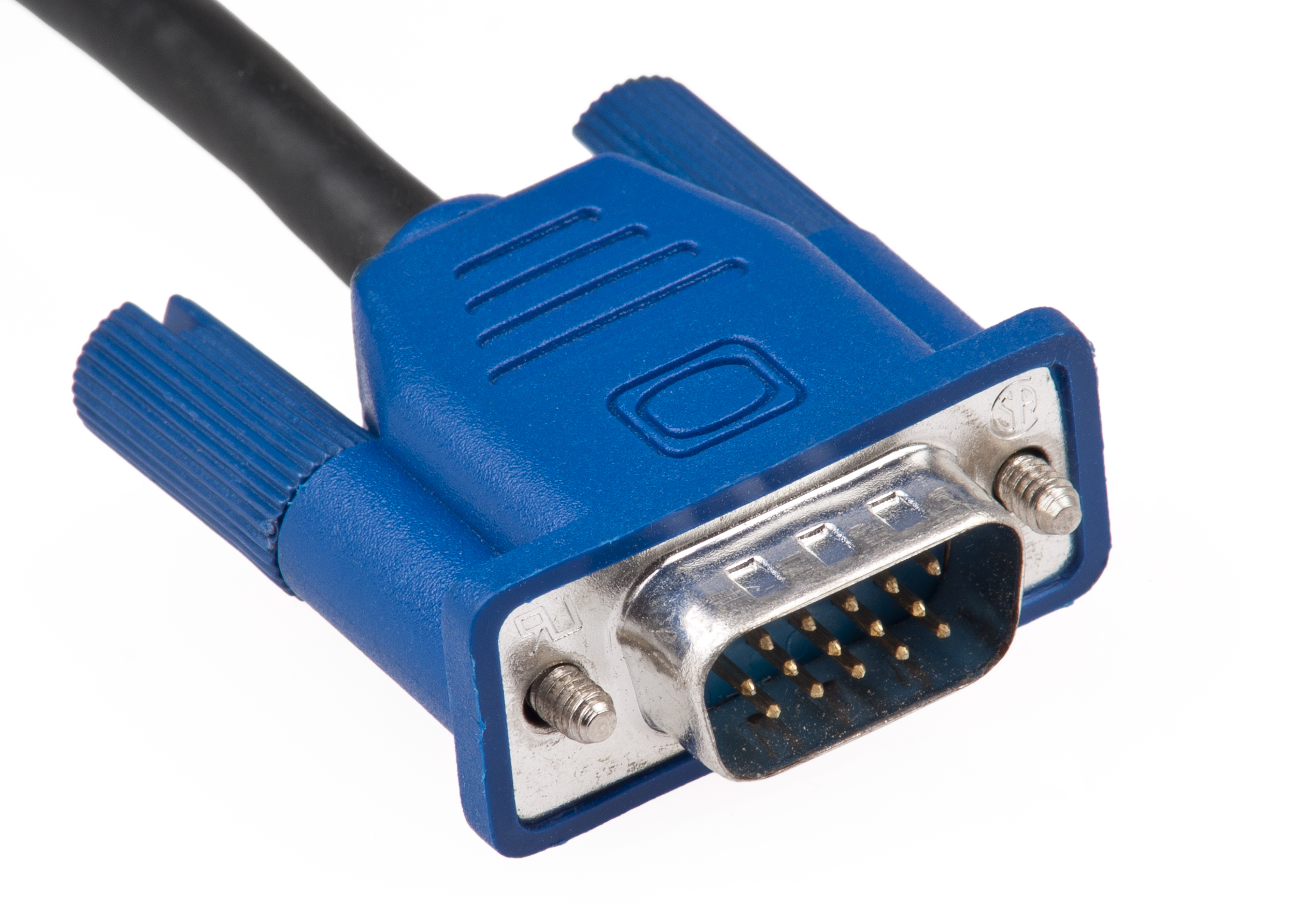
VGA, DVI to Wane Over Next Five YearsThe venerable Video Graphics Array (VGA) port and it upstart cousin digital-visual interface (DVI) port will become extinct over the next five years. So says Brian O’Rourke, research director at NPD In-Stat in a recent report published on PCWorld. NPD In-Stat points out how new laptops today come with HDMI and DisplayPort for interfacing with HDTVs, monitors and projectors.

VGA VGAhas no upgrade path, and DVI has only gone through one minor upgrade cycle; in comparison, HDMI and DisplayPort are continuously being upgraded, according to O’Rourke. More importantly, chipmakers such Intel (INTC) and AMD (AMD) are phrasing out chipset support for VGA by 2015, while AMD has announced it will phase out chipset support for DVI by 2015. NPD In-Stat is forecasting shipments of devices with DVI, HDMI, and DisplayPort to pass 2 billion by 2015.

VGA’s long history stretching back to its introduction in 1986 makes it difficult to envision a world without it. Still, there have been ample signs of its impending obsolescence, such as the introduction of DVI and HDMI ports in mid-to-high-end displays in recent years.

HDMI portOf course, its forced retirement will mean that VGA will no longer be available as a fallback option for auditoriums and function rooms around the world. The presence of interface adapters can help, though businesses will probably need to give greater consideration to the presence of multiple interface support when acquiring new display devices or projectors.

rb-

OF course, the move to HDMI is being driven by big media so they can implement their draconian vision of DRM, HDCP.


Ralph Bach has been in IT long enough to know better and has blogged from his Bach Seat about IT, careers, and anything else that catches his attention since 2005. You can follow him on LinkedInFacebook, and Twitter. Email the Bach Seat here.

Wireless Electricity Gets Closer

IntelWireless Electricity Gets Closer (INTC) has been working on wireless electricity technology for several years, which I wrote about earlier, that now works over longer distances. At its Intel Research Day at the Computer History Museum in Mt. View CA, on 06-18-2009, the company showed off a new variation of the idea that power can be transmitted through the air to run a speaker without any other power source.

wireless electricityIntel now calls the technology Wireless Resonant Energy Link (WREL). Intel’s goal of the WREL project is to cut the power cord. Building on principles proposed by MIT physicists in 2006. The WREL team has lit a 60W light bulb at a range of several feet and with 70% efficiency.

WREL works in a fashion similar to the old 1970’s Memorex commercial staring Ella Fitzgerald where a singer can shatter a glass by hitting its natural frequency, at which it absorbs energy efficiently. In the case of WREL, a coil of wire with a natural frequency around 10MHz takes the place of the glass, and a similar coil takes the place of the singer.

The technology uses two flat copper coils tuned to resonate at a particular frequency. One wire releases electromagnetic energy and the other picks it up in much the same way an opera singer can shatter a wine glass by singing at just the right pitch, said researcher Emily Cooper. The wireless electricity transmission shows the efficiency of 90 percent at distances of up to a meter, she said.

Intel hopes the technology will be useful for charging devices like netbooks or smartphones in a room without wires. Intel also predicts the technology could be used within devices such as a laptop.  to replace the fallible wires that connect laptop screens through a hinge, Cooper said

rb-

Intel logoIntel admits that the next milestone for the WREL project is to build a rectifying circuit that can convert the RF power to DC power without upsetting the carefully tuned pair of coils. Intel has demonstrated they can charge a light bulb with 60W of wireless electricity which should be sufficient to charge a laptop.

However to power a laptop or charge a battery, Intel will need DC power, not a 10MHz AC signal. The need to drive down the power requirements for the next generation of computing devices is also helping drive Intel’s latest attempt to break into the UMPC process market with the Atom chips and the next-generation “Moorestown” processor which boasts lower energy consumption requirements. It is also notable that Intel has a stated long-term plan of 60watts power for mainstream desktop processors, down from a maximum consumption of 130 watts of the new Pentium Extreme Edition 840, according to Benson Inkley, a senior processor applications engineer, with Intel in an article at Tom’s Hardware.

While it seems that Intel is on a trajectory to cut the power requirements and costs of owning and operating a PC fleet, it will be a while. It is much more likely that Moorestown processors are going to be aided by the pending IEEE 802.3at POE+ specification which will allow up to at least 30W which can be used to charge devices. It is my guess that the reports of the demise of wired networking are greatly exaggerated until Intel figures out how to economically and safely deliver 60W through the vapor.

Related articles


Ralph Bach has been in IT long enough to know better and has blogged from his Bach Seat about IT, careers, and anything else that catches his attention since 2005. You can follow him on LinkedInFacebook, and Twitter. Email the Bach Seat here.

Server Sales Slide

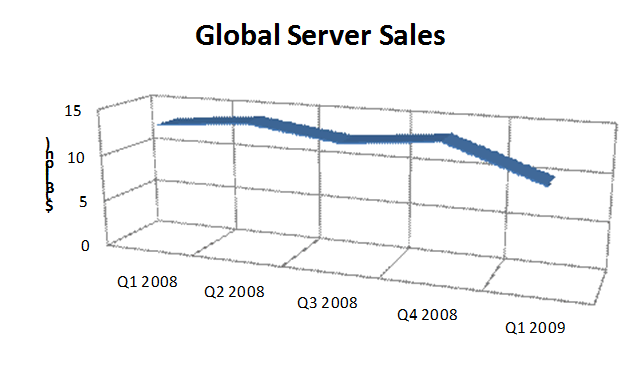
Server Sales SlideLike most of us (except the bankers) global sales of servers have taken a beating since the first quarter of 2008. Server sales have declined by over $3 billion due to the economic slowdown meltdown recession and the growth of virtualization. Today, the global server market stands below $10 billion.
Global Server Sales

IBM logoSince Q1 of 2008 IBM‘s server revenues have declined over $1 billion from $3.946 billion to $2.913 in Q1 2009. Big Blues’ market share also declined from 30% to 29.3% during the same period. On the other hand, HP (HPQ) revenues grew from $2.904 billion to $3.624 billion and grew their market share to 29.3%, matching IBM in Q1 2009. Dell’s (DELL) revenues dropped from  $1.590 billion in 2008 Q1  with a 12.1% market share to revenues of $1.093 billion and an 11% market share in Q1 2009.

HP logoAccording to the ChannelInsider article:

  • No quick recovery for server sales until the general economy recovers (CI)
  • End-users continue to extend the life of existing servers (CI, other sources)
  • Servers remain among the least profitable for solution providers (CI: Market Pulse)
  • Demand for conventional and blade servers by end-users continues to shrink (CI: Market Pulse)
  • The popularity of data center virtualization technologies have had the collateral effect of shrinking server hardware demand (CI)

Ralph Bach has been in IT long enough to know better and has blogged from his Bach Seat about IT, careers, and anything else that catches his attention since 2005. You can follow him on LinkedInFacebook, and Twitter. Email the Bach Seat here.